
Redvibe Multibrowser
multibrowser, saas, workspace, browser
6 followers
multibrowser, saas, workspace, browser
6 followers
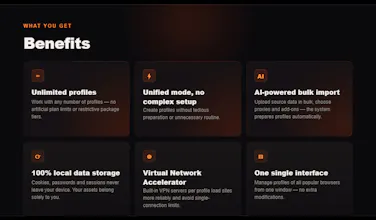
Multi-accounting browser with unlimited profiles and zero complex setup. Redvibe is designed to manage dozens of accounts on a single computer without complex setups and technical hassles. Manage clients, scale advertising campaigns, import accounts in bulk — the AI will automatically sort them into ready-made profiles. No limits or restrictions. Launch work accounts quickly, without a cluttered interface or long preparation.


Hey Product Hunt! 👋
Today, I’m launching Redvibe Multibrowser — a fast, lightweight SaaS multi-browser designed to manage isolated browser profiles, built completely solo using only AI agents.
I’m a former affiliate marketer and the founder of a small media buying team with six years of experience under my belt. I'm not a coder, and I'm not a "networker" type. Two months ago, I decided to build a SaaS multi-browser—completely solo, without a team, using only AI agents. I actually built it, and the closed beta has officially launched. Was it easy? Hell no.
At the same time, I was working as a PM in someone else’s affiliate team while dealing with severe burnout and being on antidepressants. The mental backdrop, to put it mildly, was far from a health resort.
The project was conceived as a simple multi-browser designed to easily manage browser profiles. The engine: portable Chromium. The target audience: marketers, targeters, and casual media buyers dealing with multi-accounting. I planned to build the MVP using GPT-5 and Claude 4.5 in Windsurf and Cursor within about two weeks. Needless to say, my calculations were catastrophically wrong.
I don't write code, but I know how to define clear tasks, steer development, and control the quality of the output. So, I started my journey with AI agents by drafting a spec. I didn't flesh out every single detail—I just needed to assemble the skeleton and test the core mechanics.
The Stack: Svelte 5 Runes + TS + Prisma + better-sqlite3.
To stop the LLMs from hallucinating, I wrote a strict set of system rules and handed the first tasks over to GPT-5.
Problem 1: Models Live in the Past
The first thing I tripped over was the LLMs' outdated stack knowledge. The models only knew Svelte 5 with runes in bits and pieces, confidently spitting out code for older versions of Svelte. The fix was simple: connecting MCP context7 (Model Context Protocol), which feeds up-to-date documentation directly to the agent on request.
Next came the harder part: GPT was absolutely terrible at design. Like, completely hopeless. The UI ended up incredibly crooked, and, of course, nothing worked. Through endless iterations and model-juggling, I finally managed to get the core features working: profiles launched, proxies functioned properly, and cookies didn't get corrupted.
Problem 2: Agents Can't Think Outside the Textbook
Then began the real hard work of polishing every single module to a production-ready state. I brought Gemini into the mix alongside GPT and Claude.
The critical roadblock turned out to be fingerprint masking/spoofing: the profiles had to pass undetected. The AIs coded standard, generic browser extensions that literally screamed to every advanced checker (like Pixelscan or CreepJS): "Hey, this user is a bot!"
It turned out that LLMs struggle to think of solutions outside standard, textbook practices. It's not even about censorship; it's the "academic" nature of neural networks. They suggest what they have seen most frequently in their training data, not what actually works in the gray-area cat-and-mouse game of anti-fingerprinting.
I tried various approaches, but none yielded a production-ready result. Changing models and IDEs didn't help. Ultimately, a non-standard workaround was suggested by Gemini 3.1, and implemented by Claude Opus 4.7—bypassing extensions and CDP (Chrome DevTools Protocol) entirely, working natively via WinAPI. At the same time, I consolidated the different profile workflows into a single, clean native pipeline.
Problem 3: Scraping the Entire Architecture
Midway through development, I stumbled upon a fundamental limitation that any actual software engineer would have known on day one: web browsers cannot launch other browser processes directly through their web interface. Quite the revelation. It looked like the entire "web-based multi-browser" dream was dead in the water.
I refused to give up, so I overhauled the architecture: a web interface combined with a lightweight local agent serving as a bridge between the browser and the host OS. The server has one area of responsibility; the agent has another. The implementation ended up being incredibly smooth and functional—and, looking back, this exact split is what allowed me to offer users unlimited profiles with zero cloud server hosting overhead on my end.
Surprisingly, the AI-powered profile creation gave me the least trouble. After just a few simple iterations, I ended up with what is probably the most valuable feature for high-volume multi-accounting. You literally drop a raw text file containing accounts in any messy format, and the LLM automatically parses it and distributes the credentials into ready-to-use profiles.
What I Learned About AI Models & Tools
Over these two months of intensive development, I mapped out the distinct "personalities" of the top AI models:
Claude: The muscle. Best for fixing critical bugs and building complex, non-standard functionality.
GPT: The manager. Great for code reviews, finding sneaky bugs, maintaining context, and strictly following rules.
Gemini: The creative mind. Excellent at brainstorming out-of-the-box ideas, but implementation is better left to Claude or GPT—Gemini struggles to execute them cleanly.
Chinese models: I tested several, but to put it mildly, they couldn't keep up.
Regarding my tooling environment, I eventually migrated entirely to Claude Code with Google's Antigravity acting as my safety net.
I tested every single feature on my own affiliate accounts, simulating real-world multi-accounting scenarios across various services and ad networks—essentially, I dogfooded my own multi-browser throughout the entire development cycle.
The Cost & What's Next
The total development cost was around 300 USD over two months—which covered IDE subscriptions, model API usage, and infrastructure.
Beta is now up and running. I’d love to get feedback from fellow makers, marketers, and developers.