
RcloneView
A simple GUI to manage Rclone & multi-cloud sync
3 followers
A simple GUI to manage Rclone & multi-cloud sync
3 followers
Easily sync, manage, and back up your cloud files across multiple providers like Google Drive, Dropbox, OneDrive, and more. RcloneView brings the power of Rclone into a simple, cross-platform GUI — no command line required.




Free Options
Launch Team / Built With


World model AI : Sharm SEKAISimulate your idea on a living world.
Promoted
Hi Product Hunt 👋
We’re excited to introduce RcloneView, a cross-platform desktop GUI that makes managing cloud storage with Rclone simple and accessible for everyone.
Rclone itself is a powerful command-line tool, but many people find it challenging to set up and use. That’s why we built RcloneView: to bring the same reliability and flexibility of Rclone into a modern, intuitive interface.
✨ With RcloneView you can:
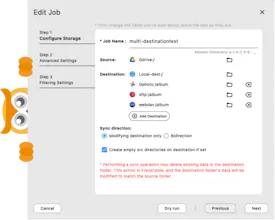
- Connect and manage cloud storage providers like Google Drive, Dropbox, OneDrive, iCloud, MEGA, and more
- Auto-detect Synology NAS devices on your network and configure them with ease
- Mount cloud drives locally and access them just like a folder on your computer
- Compare local and cloud folders side-by-side before syncing to see exactly what will change
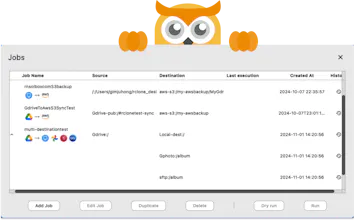
- Run copy, sync, and move jobs with clear progress, error reporting, and history
- Schedule recurring jobs and monitor transfers in a dedicated Job Manager
- Customize themes, manage embedded or external Rclone connections, and fine-tune settings without editing config files manually
RcloneView is available on Windows, macOS, and Linux. It’s designed for both beginners who just want an easier way to sync files, and advanced users who need full control of their multi-cloud workflows.
Our mission is to simplify multi-cloud file management while keeping the full power of Rclone under the hood.
👉 Learn more and try it here: https://rcloneview.com
We’d love to hear your thoughts, feature requests, and feedback — it will help us shape the roadmap and make RcloneView even better. Thanks for checking us out! 🙏
🎥 New demo: RcloneView + Wasabi Cloud!
See how to 👉 mount a Wasabi bucket as a drive, manage files in the GUI, set up scheduled sync jobs, and monitor tasks in real time.
🔗 Watch here →
#RcloneView #Wasabi #CloudStorage #MultiCloud #CloudSync
RcloneView Black Friday Sale — 50% OFF!
Manage all your cloud storage in one app — Google Drive, AWS S3, Cloudflare R2, NAS, and more.
Just click, sync, mount, compare, automate.
https://rcloneview.com/src/pricing
A great chance to upgrade your multi-cloud workfl
🚀 RcloneView 1.1 is out now — new terminal tab, app lock & improved UI
Available on Windows, macOS, and Linux.
🌟 New in v1.1:
🚩 Built-in Terminal tab
🚩 App Lock for secure access
🚩 Remote Manager UI improvements
Adjustable item sizes
Full-path copy
Remote folder preview
👉 Download: https://rcloneview.com/src/download
🚀 RcloneView 1.2 is here! (December 2025)
RcloneView 1.2 brings focused improvements to help you better manage long-running jobs and multi-cloud workflows across Windows, macOS, and Linux.
✨ What’s new in this release
• 📧 Email notifications for large file transfers (PLUS users can configure email relay)
• 🤖 Telegram notifications and remote job control — start/stop/manage jobs directly from Telegram
• ☁️ New S3-compatible storage provider support
• ⚙️ Custom rclone flags for sync & copy jobs
• 🖥️ Improved Terminal UX — copy selected text to clipboard
This release is all about better visibility, control, and reliability for real-world cloud sync and backup workflows.
🔗 Learn more & download:
https://rcloneview.com
#RcloneView #rclone #MultiCloud #S3 #Backup #CloudStorage #DevTools