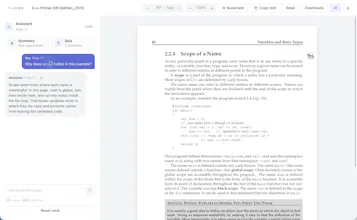
Quincy is a local-first PDF reader for Mac built for working through dense documents. Ask questions about the page you’re reading, generate summaries and quizzes, take notes, bookmark pages, copy text, and listen to passages aloud while keeping your place. On top of that, beautiful UI/UX with easy keyboard-based controls
No reviews yetBe the first to leave a review for Quincy
Hunter
📌
Recently, I found myself having to read the book "C++ primer" and I just couldn't do it. Maybe my attention span is too short now with Claude and Codex, maybe I'm lazy... but I just couldn't get myself to focus.
While reading, I needed something to do. I wanted to talk to the text, I wanted to leave notes, I wanted to use to use my keyboard to quickly flip through pages.
The only good available option on a Mac was "Preview" and it was ok, but definitely not there. So I built Quincy primarily for myself.
With it, you can - "Talk" to the page you're reading, create a quiz about the page, and get a good summary - "Read" the page out-loud. Have your Mac read to you while you follow along. This helps with comprehension. - Copy text (to paste into an LLM), leave notes, bookmarks, etc.... - Anything else you'd want with a nice PDF reader
It's fully local. No cloud-sync (yet). All LLM calls are based on your keys. And TBH, you don't even need to use the AI features for this to be useful.
Try it out. Let me know what you guys think. This has been a quick project, so very rough around the edges. I plan on keeping it going (still haven't finished my book), and potentially open-sourcing it down the line.