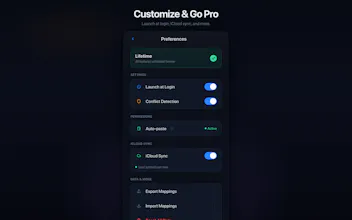
QUICOPY is a lightweight macOS menu bar app that lets you assign global keyboard shortcuts to text snippets. Press a shortcut — your text appears instantly at the cursor, no matter what app you're in. It ships with 7 built-in AI prompt templates (Step-by-Step, ELI5, Translation, CO-STAR Framework, and more) — each pre-mapped to a shortcut like ⌘⇧1 through ⌘⇧7. Type your question in ChatGPT, Claude, or any AI tool, hit the shortcut, and the full prompt wraps around your input.
No reviews yetBe the first to leave a review for QUICOPY
Maker
📌
Hey everyone! I'm the solo developer behind QUICOPY.
I built this out of a simple frustration: every day I was copy-pasting the same AI prompts, email templates, and code snippets across dozens of apps. "Think step by step", "Explain like I'm 5", email signatures — over and over.
I wanted something dead simple: press a shortcut, text appears. No app switching, no clipboard managers, no menus. Just one keystroke.
The AI prompt feature surprised me the most — I pre-loaded 7 battle-tested prompt templates (Step-by-Step, ELI5, CO-STAR Framework, etc.) and mapped them to ⌘⇧1 through ⌘⇧7. Now when I'm in ChatGPT or Claude, I just type my question, hit the shortcut, and the full structured prompt wraps around my input instantly.
It's 100% native Swift, just 2.8 MB, and everything stays on your Mac. No tracking, no cloud uploads.
Would love to hear how you'd use it — and happy to answer any questions!