Launching today

Purr Notes
Markdown, tasks & local AI
3 followers
Markdown, tasks & local AI
3 followers
Purr lives on the edge of your screen. Click the edge or press ⌘⇧N and your notes slide in. Capture from any app with ⌘⇧Space, write in Markdown, record voice notes and ask Frida, a private AI on your Mac. Free up to 20 notes. Pro is a one-time purchase.






Free Options
Launch Team

AWS Activate CreditsCredits that fuel your startup’s next milestone
Promoted
Hi Product Hunt! 👋 I'm Bastián, an indie developer from Chile, and Purr is my first Mac app.
Why I built it: I kept losing ideas because opening a notes app meant leaving what I was doing. So I made notes live on the edge of the screen. Click the edge (or press ⌘⇧N), write, and get back to work. That's it.
What it does:
• A notes panel on the edge of your screen, always one click away
• Quick Capture from any app with ⌘⇧Space
• Markdown, [[wiki links]], #tags and tasks
• Voice notes, transcribed on your Mac
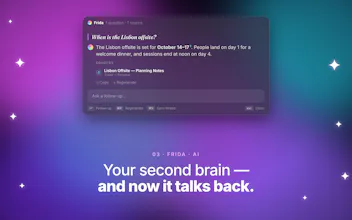
• Frida, an AI that answers questions about your notes and runs 100% on your Mac. Your notes never go to a server.
• iCloud sync, and optional export to Obsidian and Apple Notes
Privacy: no account, no ads, no tracking. The App Store label says "Data Not Collected".