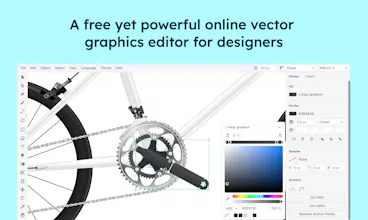
Provector lets you creating sophisticated vector graphics with full-featured vector drawing tools. Precise control over your design artwork to create high-quality illustrations and icons. A solid set of path editing features help you to realize your ideas.
Hi 👋 everyone,
I am excited to introduce Provector to you, a lightweight yet free vector graphic drawing tools.
🚀 What is Provector?
Provector is developed since 2021 as my first side project. As a designer and meanwhile a developer, I try to deliver the most needed features for technical drawings and illustrations. The user interface and design is based on my expectations on using the drawing tool, which should be lightweight, powerful and easy to use. Provector supports CAD level object snaps, advanced path editing and common design tools.
🔥 Why Provector?
✅ You can use it directly in a modern browser and it is free.
✅ Advanced path tools: pen tool, anchor point tool, shape builder, trim path, live corner, perspective transform and more...
✅ Advanced path editing command: offset path, outline stroke, smooth path, merge overlapping points and more...
✅ CAD level object snaps (curves, points, middle points, tangent, intersections, boundaries).
✅ Drag-Drop or paste the images from the web or your computer into your artworks.
✅ Access local fonts without any browser plugins.
🎯 How can I get started?
If you have experiences with other vector drawing tools, like Adobe Illustrator or Figma, you will be able to start using Provector without any problems. You can also start with the documentations to learn Provector as beginner.
🎉 We appreciate your insights!
Does Provector effectively solve your pain points?
Is the user interface and design meeting your expectations?
What additional features or improvements would make Provector even better for you?
How likely are you to recommend Provector to others based on your experience so far?
Cheers,
Diao Liu
@diao_liu Provector looks incredible. As a designer who's lived in Illustrator for years, I love seeing browser-based vector tools that don't compromise on power.
I'm Tarzine Jackson, founder of Desivity - a decentralized social platform for creative professionals launching Q1 2026. We're building a space where designers showcase portfolios, connect with peers, and access professional tools all in one place.
We're exploring partnerships with vector tools like Provector to give our community seamless access to the software they need. Would love to chat about potential collaboration opportunities.
We're also on Product Hunt building in public! Always excited to connect with fellow maker-founders.
Liu, I just loved it. You don't know how much happy I am. The shape builder tool, offset path, high level snapping, all of these are great. Could you add some features like conic gradient, ability to create more dynamic shapes like heart, diamond, cogwheel, etc, triangular/isometric grid, etc? Btw, what is the best way to stay connected with you?
@hishahadat really appreciate and thanks for your reviews. Your suggested features are just great , I will add it the top of my list. I will implement those in the next releases. You can keep contacts with me on GitHub or Email.
Report
Great to see more independent vector tools come out. Great job man works really nicely. Love the no-create account approach as well.
@jsteneros you could be the first user, welcome to give feedbacks on our product 🙌, I am aimed to provide the most intuitive and powerful drawing tool to the designers.
Report
@diao_liu awesome. I did give it a spin. Will try it a bit more in the coming days.
Congratulations on launching Provector! I was looking for an in-browser vector manipulation tool since a long time and this one is really well executed and is pretty close to adobe illustrator as well in terms of the major functionality. However, I was not able to find an option to export the file/frame as an SVG also seems like the export to PDF feature also needs some tweaking. Great tool though loved it 😍
@ggsingla Really glad to hear you are using Provector. Currently you can select frames and export them to SVG files in Export Panel. It is a good catching, I will add an option in file menu to export file/frames to SVG.
It's just a next level product for vector editing. I have used Illustrator and Inkscape which needs to be installed on a device. Even the web-based version of illustrator is in beta. This tool provides the flexibility of using vector editing on the go. Congrats on the launch. Hope u extent your capabilities to high end editing software.
Report
Feature request if not already included.
- Page sizes in mm, m, inches ect...
- Custom colour pallets, CMYK, Pantone, Printer Specific Use Cases
- Multiple people can work on the file at the same time
- Export/Save as .eps .ai .pdf
- Nesting
- Auto batching text in a design
- Fillet, Chamfer corners & nodes
- Organise work into folders
- Template libraries
- Font sorting into, serif, sans serif, hand written, favorites ect....
- Ability to adjust kerning easily, via mouse click and drag on individual letters
- Line up guides
- Smart snap to object
- Multiple Artboards/Pages
- History
- Snap text to curve
This is all I can think of at the moment.
Provector
Provector
@diao_liu
Provector looks incredible. As a designer who's lived in Illustrator for years, I love seeing browser-based vector tools that don't compromise on power.
I'm Tarzine Jackson, founder of Desivity - a decentralized social platform for creative professionals launching Q1 2026. We're building a space where designers showcase portfolios, connect with peers, and access professional tools all in one place.
We're exploring partnerships with vector tools like Provector to give our community seamless access to the software they need. Would love to chat about potential collaboration opportunities.
We're also on Product Hunt building in public! Always excited to connect with fellow maker-founders.
Feel free to reach out.
Congrats on the launch! 🚀
Akriti! 100+ Abstract Vector Shapes
Provector
Provector
Build Check
Provector
Tootler AI
Provector
Tootler AI
Provector