Launching today

Prompt Code
A Markdown editor and snippet manager for AI prompts
1 follower
A Markdown editor and snippet manager for AI prompts
1 follower
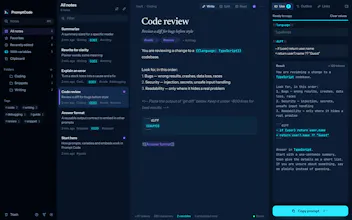
Write prompts as plain Markdown files with {{variables}}, reusable ![[embeds]] and private notes stripped on copy. Press ⌥⌘V in any app to paste a prompt or a clip from history. Local-only: no account, no telemetry. Free, open source, ~12 MB.


Free
Launch Team

Render: Get up to $100K in startup creditsThe fastest way to deploy and scale apps and agents
Promoted
Hi Product Hunt! I'm Masaaki, the maker of Prompt Code.
I wanted the parts of Obsidian that make writing pleasant (plain Markdown files in a folder you own, links, backlinks) and the parts of massCode that make reuse fast (folders, tags, one-click copy), in one app built for AI prompts.
What it adds for prompts:
Variables: {{topic}}, {{tone: friendly | formal}} become form fields, with a live preview of the finished prompt.
Embeds: ![[Answer format]] pulls another note in on copy, so a persona or output contract lives in one place.
Quick paste: press ⌥⌘V in any app, pick a prompt or a clip from your clipboard history, and it is pasted where you were typing.
Nothing leaves your Mac: no account, no telemetry, no network requests. It is also small on purpose. Tauri uses the system WebKit, and the local server runs on txiki.js (a ~6 MB QuickJS runtime) instead of Node, so the app is about 12 MB.
It's free and MIT-licensed. I'd love to hear how you organize your prompts today, and what would make you switch.