
Prizmi
Your proactive AI assistant, for everyday life
9 followers
Your proactive AI assistant, for everyday life
9 followers
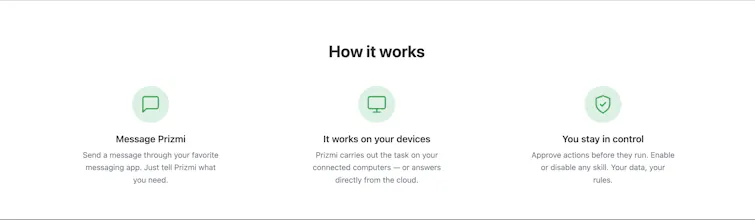
Prizmi is a proactive AI assistant for everyday life. Unlike chatbots that only answer questions, Prizmi takes action across your phone and computers: drafts texts and emails, organizes files, fills out web forms, runs tasks on a schedule, and reaches out when something matters. You make the final call. Prizmi never clicks Submit, Pay, or Send for you. Works on Mac, Windows, and Linux. Built for everyone, grandparents to developers. Privacy-first, with end-to-end encryption for sensitive data.




👋 Hi Product Hunt!
We built Prizmi because we wanted an AI assistant that actually does things for us, not one that just explains how. You tell it what you need, and it gets it done across your phone and your computers.
Some examples:
📧 "Check my email every weekday at 9am, 11am, 3pm, and 5pm and draft replies for me"
💊 "Send me a reminder to take my medication every day at 6pm"
🌴 "Turn on my Gmail vacation auto-reply from Monday to Friday, and write a message for me"
🗂️ "Sort my Downloads folder by file type"
💻 "Look at my screen and solve this coding question"
🎁 New users get free credits to try it at prizmi.ai
Set something up once and it keeps running on its own. It also remembers what you've told it, so when it checks in, it's about your actual life, not a generic nudge. You can turn check-ins, or any other skill, on or off with one toggle.
🔒 Your messages and what Prizmi remembers are encrypted, and each person's data is kept separate. Prizmi never clicks Submit, Pay, or Send. You make the final call, and you decide what it can do and which folders and sites it can reach.
You chat with it from a messaging app, and you can connect a Mac, Windows, or Linux computer when you want it to do things there too. 30+ skills and growing.
We'd love your feedback, especially how onboarding felt and what you'd want Prizmi to do next. We read every comment and ship fast.
Happy to answer questions. Thank you!
- Hadi
How does Prizmi actually access and act across apps on my phone and computers, does it need deep system permissions or some kind of companion app running on each device I want it to work with?
@aydn83019986178 Hey Aydın, great question. Short version: nothing deep, and nothing running on your phone.
On your phone, chatting with Prizmi is as simple as messaging a friend. It only ever has the access you choose to give it, and simply chatting needs none. You connect in seconds by tapping a link (it opens right in a messaging app like Telegram), or you can just use your web browser with nothing to install at all. From there, your phone is simply where you chat with Prizmi and tap to approve things.
On a computer, if you want Prizmi to actually do things there (organize files, help with your screen, complete a task in your browser), you install a small companion app called Prizmi Link on that specific machine. It runs in the background under your normal user account with no deep system permissions. You decide exactly what it can touch: you pick which folders it may read or write and which websites it may visit, right inside the app. It can't go outside those lists or change its own permissions, and you can set different rules per computer (for example, allow file access on your home desktop but not your work laptop).
You only install Prizmi Link on the devices you actually want it to act on, so it's completely optional. A lot of what Prizmi does (email, calendar, web research, reminders, scheduled tasks) runs entirely in the cloud and needs no computer at all.
Happy to go deeper on any of this. A few docs that cover it:
How Prizmi works: https://prizmi.ai/docs/entry/how-does-prizmi-work/
Controlling what it can access on a computer: https://prizmi.ai/docs/entry/how-to-control-device-access/
Whether it ever acts without permission: https://prizmi.ai/docs/entry/will-prizmi-act-without-permission/
Whether you even need a computer: https://prizmi.ai/docs/entry/do-i-need-a-computer/
How does the scheduling feature actually work in practice, like does it run locally on my machine or do tasks get executed through your servers, and is there any cap on how many scheduled automations you can set up?
@bardfsz Hey Barış,
Where it runs: entirely on our servers, in the cloud. When you set up a scheduled task, we hold the schedule and the clock on our side, so your machine doesn't need to be on, awake, or running anything for it to fire. That's the main practical difference from a local cron job or automation tool: your laptop can be shut and the task still runs on time.
The only moment your computer is involved is if a task specifically needs to act on it (say, organize a folder or read a file there). At run time, Prizmi sends a signed instruction to the Prizmi Link app on that machine. If it happens to be offline, the task waits in a queue and completes automatically once the machine is back, and we let you know it's waiting. Tasks that live entirely in the cloud (managing emails, reminders, web research, weather, news, texting) never touch your computer at all.
On limits: you can currently have up to 20 automations set up at once, counting your recurring schedules plus any one-offs still waiting to run. One-offs free their slot as soon as they fire, and you can pause or cancel anything anytime to make room.
A few docs that go deeper:
How scheduling works: https://prizmi.ai/docs/entry/can-prizmi-schedule-tasks/
Setting up a recurring task: https://prizmi.ai/docs/entry/how-to-create-recurring-task/
What happens if your computer is offline: https://prizmi.ai/docs/entry/what-if-computer-offline/
Pausing or cancelling a task: https://prizmi.ai/docs/entry/how-to-pause-resume-cancel-task/