
Presentify
Take your presentation skills to the next level
365 followers
Take your presentation skills to the next level
365 followers
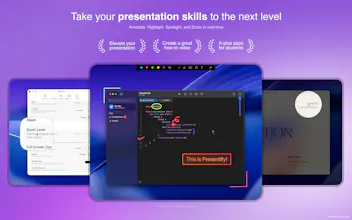
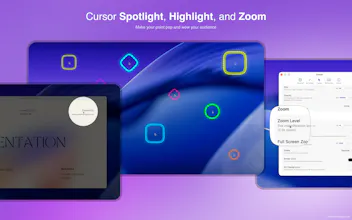
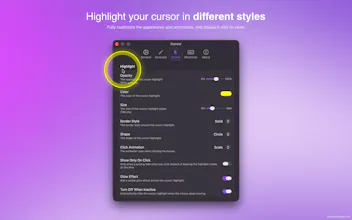
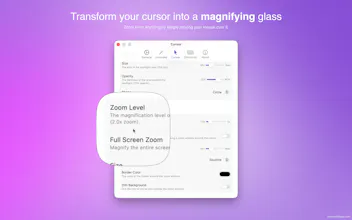
Presentify is a macOS app for annotating your screen, highlighting your cursor, spotlighting important areas, and zooming in for a closer look. It works with any presentation app, including Keynote, Google Slides, and Microsoft PowerPoint, as well as video calling apps like Zoom, Microsoft Teams, and Google Meet.





This looks promising in terms of ease f use balanced with functionality. The real proof will be in using it under deadline conditions i.e. how well does the UI layout help...
@randalltrini you can configure all actions in Presentify on your Stream Deck or similar device for even faster workflow. This definitely helps me personally when I have limited time to demo or present something.
Nice app! I use a similar one and often take screenshots at work and need to point things out with arrows. Your app has more functionality than mine.
@natalia_iankovych Thanks Natalia. Presentify is different than screenshot apps as it allows you to annotate in real-time as opposed to first taking a screenshot and then annotating. So you can quickly draw lines, etc. when on a call or when recording your screen etc.
That said, you can also use it to annotate screenshots. For this, just annotate where ever you want to and press S to save the annotation as an image.
Presentify is one of those apps that does one thing exceptionally well. I’ve been using it for my remote classes, and it has made a noticeable difference. Some of my students have even started using it themselves. Congrats on the relaunch, and highly recommended!
@uxfoolcom thank you Lucas for taking the time to share your experience. If you have any ideas or feedback in mind, you can submit them here - https://tally.so/r/rjvVq2
I've been using Presentify for about a month.
Its so powerful to be able to show people know exactly where to look while you are sharing your screen. It helps the viewer understand the message much more effectively.
The app has been really well thought-through. Glad to have it on my Mac.
@kole_ogundipe1 thanks Kole. I come to know many wonderful people through this app and you’re one of them. Looking forward to our conversations on LinkedIn.
Glad to see it! I’ve been using it and have 2x’d the quality of my demos. I hear from prospects often, “that feature you spotlighted was exactly what we needed to know about” and “the annotations helped me out, I’m a visual person”. It’s become such a necessary part of my tech stack.
@karachlyn this is a great feedback. I would love to see your demos (if they are public) in which you have used Presentify. I might feature them on the website too.
As someone who records educational content regularly, Presentify has been incredibly useful for my courses on Udemy, Tutorialspoint, Luvenica, and Insight Timer. Being able to highlight important areas on screen instantly improves the learning experience for students. Clean, lightweight, and practical. Wishing the team a successful launch!
@adrija_choudhury thank you Adrija for sharing your experience. It's great to hear from existing long-time users of Presentify.
I've been using Presentify since 2023, and it has become an essential part of my daily workflow. The app is incredibly useful, easy to use, and the developer regularly releases new features and improvements. It's amazing to see how consistently it evolves, making presentations and screen sharing more engaging and effective. Highly recommended!