
Presentify
Take your presentation skills to the next level
365 followers
Take your presentation skills to the next level
365 followers
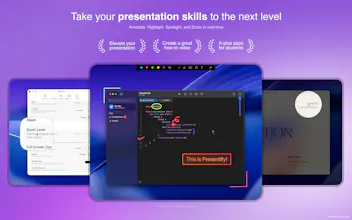
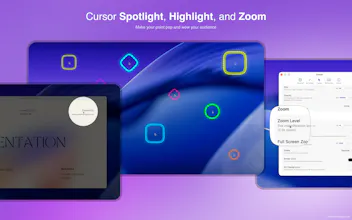
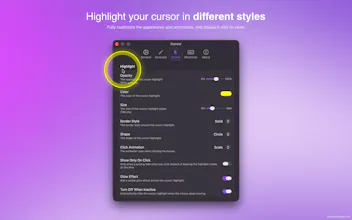
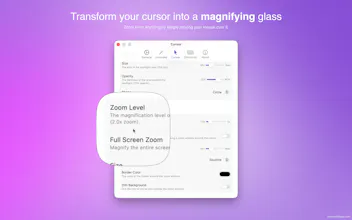
Presentify is a macOS app for annotating your screen, highlighting your cursor, spotlighting important areas, and zooming in for a closer look. It works with any presentation app, including Keynote, Google Slides, and Microsoft PowerPoint, as well as video calling apps like Zoom, Microsoft Teams, and Google Meet.





Hey Product Hunt 👋
We built Presentify to make presentations and video calls more engaging — whether you're teaching, demoing, pitching, or recording tutorials. It works with apps like Keynote, Google Slides, Microsoft PowerPoint, Zoom, Microsoft Teams, and Google Meet.
To celebrate the launch, here’s a little Product Hunt gift 🎁
Use code PRESENTIFY20 for 20% off when bought directly on the website.
And because launch days run on caffeine and comments…
Leave a comment below and I will send you an even better deal 👀
@rampatra Hi, i like the app and would like to purchase it with a better deal :)
Congrats on the launch. I started using Presentify in April 2023. I was tutoring secondary school students in maths and physics online and I was looking for a cursor highlight. I got so much more and appreciate the continued development and added features over the last 3 years. Whether I tutor students online or face to face I use Presentify in every session for the majority of the sessions. The ability to annotate anywhere on the screen while looking at a pdf, website, etc really helps when working with students. I use the freehand tool to write when working through problems with students. Fantastic app.
@pam_evans1 nice to see such support from a long-time user. If you would like to improve the app further, you can fill out this form - https://tally.so/r/rjvVq2. Your ideas and feedback will be invaluable.
Screen annotation is underrated for teaching anything technical — I record an Excel/financial-modeling course on Udemy, and the moments that actually land are when you can spotlight one cell or trace a formula live instead of waving a cursor around. Cursor highlighting and zoom would've saved me a lot of re-recording. Does Presentify let you pre-set spotlight regions per slide, or is it all live/on-the-fly during the talk?
@samir_asadov it’s live / on the fly type of app but with key shortcuts you won’t have any hassle doing it live. Moreover, with Stream Deck it can be even more seamless.
Came across this on PH today, and it immediately makes sense. I do a lot of screen demos for clients, for content, and the cursor visibility thing is a real problem. You're pointing at something on screen, and the person watching has no idea where to look.
The zoom-in feature is what gets me. Most presentation tools make you plan your zoom points. If this works live during a Zoom call, the way the listing suggests, that's actually useful.
Congrats on the launch. Going to try this on my next client demo.
@joy_shekhar thanks Joy for your comment. Yes, it works with Zoom and other video calling apps.
Presentify’s current Zoom feature is unique and helpful but there’s a new feature coming up where you can simply select multiple areas on screen and it will appear zoomed in.
Does it have a spotlight with softer edges??
@mindstormer this is a nice feature request. I'll add it in the next version. Currently, it has Spotlight with different shapes and with optional zoom.
@matthias_bettin I didn't do anything from my side. The Mac App Store did it themselves, maybe from the number of downloads and reviews.
Looks really nice - was hoping to give it a try but the Homebrew installation fails!
@cronberry thanks Jonathan for your interest. You will need a license even when installing via homebrew. But no worries, I will send one to you as part of the PH promotion today.
And, regarding the homebrew issue, you'll have to wait for at least 3 hrs for homebrew to update the checksum. Sorry for the inconvenience but you can click the Direct Download button if you want to use it right away.
Update: homebrew has been updated now and the install via homebrew should run fine.