Launching today

Pling
A tiny Retro Game styled tally counter for your Mac menu bar
11 followers
A tiny Retro Game styled tally counter for your Mac menu bar
11 followers
Count anything from your Mac's menu bar. One click or one hotkey: the pixel digits flip, the coin chimes, the number goes up. Other habit apps want to coach you. Pling just wants to count. No account, no subscription, no streak to break. Free.


Free
Launch Team / Built With


Framer AI AgentsDesign and publish professional sites with AI
Promoted
I grew up playing Game Boy, Nintendo, and Sega. Playing 16-bit platform games and RPGs 👾
And as a busy adult, I wanted to bring back some of that cheerful feeling to my days.
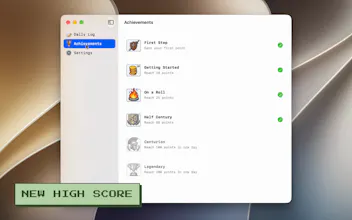
Streaks and scores gamify everything, so I thought, why not have the whimsical counter in my menubar to keep track of my daily scores of small achievements: Sending emails, writing X replies, standing up from my desk... Anything goes.
Every app I tried promised high productivity. They wanted me to create an account, a subscription. They were serious, not fun.
And breaking a streak made me feel guilty. I didn't want a coach. I wanted a number that goes up and makes a nice sound.
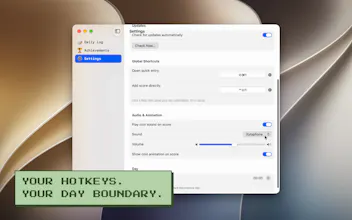
So Pling is deliberately the anti-habit-tracker. Click the menu bar, or press a hotkey, and the number goes up with a coin sound 🔉
It resets every day (configurable reset time for night-owls).
There are no streaks to protect and no notifications telling you you've let yourself down.
I wanted to focus on keeping it fun all the way, from the moment you install it on your computer (you can get it at the Mac App Store, or download it directly from the site)
Your tally, your notes, and your settings never leave your computer.
There's no account and no analytics.
The obvious question is where the paid tier is. There isn't one. Pling is free, and there's nothing in it pressuring you toward a purchase. It’s just there to bring some fun to your workday.
It’s available for Mac OS (and only Mac, sorry, PC users, but the whole concept is to keep it in the top menubar)
Native Swift, 2.3 MB, macOS 14+. Happy to answer anything.
Does it keep yesterday's number anywhere after the daily reset, or is it gone for good?
@adamvisu yes, it keeps all the logs.
You can see it on the 4th screenshot :)
It shows the total daily count for each day, and each item logged that day.