
Pixel2Pixel Save Image As Chrome Plugin
Convert WebP/JPG/PNG & grab background/overlaid images
3 followers
Convert WebP/JPG/PNG & grab background/overlaid images
3 followers
Adds a custom “Save Image As…” to Chrome’s right-click menu giving power users instant conversion to PNG, JPEG, WebP or AVIF and the ability to grab tricky assets-from CSS backgrounds to photos partly covered by text, stickers, masks, or other layered effects.



Hello Product Hunt,
I couldn’t find a single Chrome extension that did everything I needed, so I set out to build my own. The goals were:
Save every download as PNG or JPEG: convert WebP files on the fly, or keep the original if it’s already PNG or JPEG.
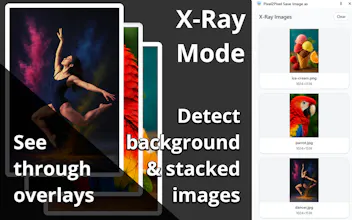
Capture tricky images with one click: grab background images, stacked layers, or graphics with overlays just as easily as visible pics.
Flexible download behavior: switch between Chrome’s “remember last folder” mode—perfect for bulk saves—and a smart filename suggestion that echoes the image’s original name.
Fine-tune quality settings: control compression quality when conversion is needed.
Bringing all those features together in one tool is why I decided to create the extension myself.
I’d appreciate your feedback on how this fits into your design, QA, or content-collection workflow and what improvements you’d like to see next. Thanks for taking a look!