An all-in-one testing suite for your hardware: keyboard, mouse, controller drift, mic, webcam, dead pixels, refresh rate and more. 100% client-side — no downloads, no sign-up, and nothing you do ever leaves your device. Free forever.
No reviews yetBe the first to leave a review for PeriphCheck
Maker
📌
Hey Product Hunt! 👋
I built PeriphCheck because testing your own hardware shouldn't require downloading sketchy software or wondering where your webcam feed goes.
It's 15 tools in one place: keyboard tester (with key chatter + NKRO detection), a 10-second controller drift test, mouse double-click bug detector, mic/webcam checks, dead pixel test, real refresh rate detection, and more.
The whole thing is 100% client-side — there is literally no backend. Your keystrokes, audio and video are processed in your browser's memory and never uploaded. It's also fast (every page under 50KB of JS) and works on mobile.
My favorite detail: the controller drift test gives you an actual deviation percentage, so you know if your stick is fine (<2%), fixable (2–5%), or needs a new module (10%+).
Would love your feedback — especially if a tool misreads your hardware, tell me the model and I'll fix the mapping. Everything is free, no strings.
Report
Ran my controller through it and the drift test caught an issue I didn't even notice in games. Love that everything runs locally.
Report
Maker
@fatmazaytr9gjw Thank you Fatma! 🙌 That's exactly the scenario I built it for — small drift hides in games because most titles apply a deadzone on top of the raw input, so you never see it until it gets bad. The test reads the raw values, which is why it caught it early.
Out of curiosity, what deviation % did it show? If it's in the 2–5% range, recalibrating or cleaning around the stick base usually buys you a lot of time before it needs a module swap
Report
finally something that runs my controller drift test without forcing me through a sketchy exe. refresh rate check felt accurate against my monitor's spec, too.
Report
Maker
@sinan108042 Thanks Sinan! The "sketchy exe" problem is literally why this exists 😄
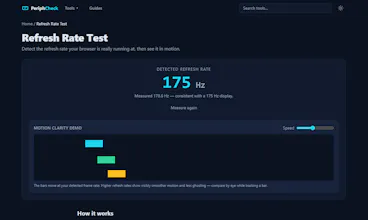
Glad the refresh rate test matched your spec — it measures real frame timings via requestAnimationFrame instead of just reading what the OS reports, so it catches cases where a 144Hz monitor is silently running at 60Hz because of a wrong cable or display setting. If it ever shows a number lower than your monitor's spec, that's usually the cable/settings, not the test.
Ran my controller through it and the drift test caught an issue I didn't even notice in games. Love that everything runs locally.
@fatmazaytr9gjw Thank you Fatma! 🙌 That's exactly the scenario I built it for — small drift hides in games because most titles apply a deadzone on top of the raw input, so you never see it until it gets bad. The test reads the raw values, which is why it caught it early.
Out of curiosity, what deviation % did it show? If it's in the 2–5% range, recalibrating or cleaning around the stick base usually buys you a lot of time before it needs a module swap
finally something that runs my controller drift test without forcing me through a sketchy exe. refresh rate check felt accurate against my monitor's spec, too.
@sinan108042 Thanks Sinan! The "sketchy exe" problem is literally why this exists 😄
Glad the refresh rate test matched your spec — it measures real frame timings via requestAnimationFrame instead of just reading what the OS reports, so it catches cases where a 144Hz monitor is silently running at 60Hz because of a wrong cable or display setting. If it ever shows a number lower than your monitor's spec, that's usually the cable/settings, not the test.