
PeekFocus
Make your screen instantly presentable with one keystroke.
85 followers
Make your screen instantly presentable with one keystroke.
85 followers
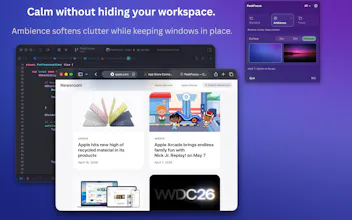
PeekFocus makes your screen instantly presentable. When your desktop is cluttered and you need to share your screen, it blurs, dims or overlays custom image so what you are working on stays clear, calm, and ready to show. Three modes: Standard - your normal desktop, Ambience - a calm ambient backdrop, Focus - where only your active window remains visible. Frosted blur, smooth dim, or custom image. Multi-display. Menu bar. No subscription. 7-day free trial. One-time purchase.




ActiveStat
Hi everyone,
PeekFocus started from a simple problem: your screen is rarely as clean as you want it to be - especially right before a screen share or client call.
Instead of reorganizing your desktop, PeekFocus works in one keystroke - dimming or blurring everything behind your active window so what you are working on is instantly clear, calm, and presentable.
It’s just as useful for staying in flow day-to-day, but it really shines in those moments where your screen needs to look intentional without effort.
Three modes let you choose how much to simplify your workspace - from a subtle ambient backdrop to full focus where only your active window remains.
Built natively for macOS, runs entirely locally - no analytics, no tracking. One-time purchase, no subscription.
Launching with a special offer for the PH community — $3.49 using code YZNJIYMA → https://lucidbit.lemonsqueezy.com/checkout/buy/98dba67f-db04-4ff5-877d-9a1dcd053c79 (first 50 redemptions, valid until May 8).
Also sharing 5 App Store codes (first come, first served):
XWKT6E7P8REN6RMYX8 · YRHXEEA7NKLTMKY343 · XP3TRYNAK6P3NNKHX4 · YX6687LNNMX3L6XMPH · 7LPKMLN6KEMPE6JJHE
Would love to hear how you handle that “about to share your screen” moment today.
Congrats on the launch, Sulochanal. Japan-based Mac/iOS founder here.
One Japan-specific thought: PeekFocus could fit here less as a generic focus tool and more as a “look calm instantly” tool for dense Mac workspaces: crowded desktops, JP/EN docs, Slack/LINE notifications, browser tabs, and screen-share moments in client calls or online lessons.
The local angle I’d test first is not just “blur distractions,” but “make your active window feel presentable in one keystroke without reorganizing your whole desktop.”
That could matter for freelancers, teachers, consultants, and small teams who often work from visually messy but privacy-sensitive Mac setups.
ActiveStat
@wakuta Thank you! that is really a sharp way to frame it. “Look calm instantly” captures it perfectly.
That's exactly the kind of moment PeekFocus is built for! one shortcut to make whatever you’re working on immediately presentable, especially during screen shares or client calls without needing to reorganize your workspace.
Your point about dense setups and privacy-sensitive environments is spot on. I will definitely lean more into this angle in how I position it.
@lucidbitapps Glad it resonated, Sulochanal. I think that “presentable in one keystroke” angle is much stronger for Japan than a generic anti-distraction pitch, especially for screen sharing, lessons, and client-facing work.