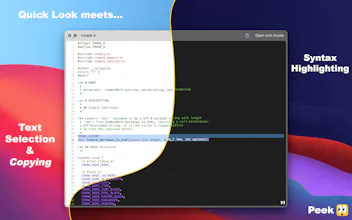
Accelerate your workflow with the Quick Look conveniences that only* Peek can deliver: copying, searching, jumping, restoring, syntax highlighting, & more. *Functionality not otherwise commercially available anywhere else within the continents of Earth.
Ever since the banning of the infamous QLEnableTextSelection in 2015, the macOS community has been lurking in the depths of the deep for six long years seeking a suitable replacement to quench their previously attainable levels of convenience.
Enter Peek: not the hero we deserve, but the hero we need—with text selection & copying, scroll restoration, syntax highlighting, & Github-flavored Markdown rendering. The world as we knew it would no longer exist. The meek, forbearing world of non-interactive Quick Look previews is no more, for we want… nay, we expect a better [user] experience.
So to a world that demands ever-more harmony, I introduce Peek.
I didn't know I couldn't live without this. I also explored the alternatives: iPreview, glance, and the various native quicklook plugins, and Peek is far ahead of all of them. Easily worth the $8.
One downside is that it is not open-source (at least, I couldn't find it on github).
Report
The support has been abandoned? And there has been no updates for three years.
Report
@samuelfei I believe it doesn't work under Tahoe anymore. Ca you confirm this?
Peek - The Ultimate Quick Look Extension
TweetDeck in #280Characters
The support has been abandoned? And there has been no updates for three years.
@samuelfei I believe it doesn't work under Tahoe anymore. Ca you confirm this?