
PDG Mail: Zero-Knowledge Private Email
True privacy-focused email with zero-knowledge encryption
4 followers
True privacy-focused email with zero-knowledge encryption
4 followers
PDG Mail is the secure email alternative that puts privacy first. With zero-knowledge encryption, Hong Kong jurisdiction outside Five Eyes, and IMAP/JMAP support, your emails stay private. No tracking, no AI—just secure communication.


@iamcaptainjez @iamcaptainjez Hey man, love the concept and the way you have executed it!
Quick 2 points -
1. I think the expectation is the user stores the private keys. A demo of how it works and looks in practise would be great before having to sign up and give my card details. Since encryption is your stand out point, you really need to surface how it works especially for early adopters since they will be comprise who understand the point of zero knowledge encryption
2. The ‘Why we’re different button’ doesn’t seem to work in the Hero section
Overall, love the initiative and where you are going with this. Will be following closely.
@samy8 Hey thanks so much for the feedback!
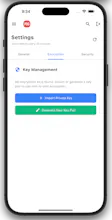
We've made the process of generating keys as easy as possible. I'll have the team update the site to make it clearer, but to clarify there are several options for how a customer can handle this.
1) Through our PDG Mail portal.
You can either generate a key here, which will make the private key available for download one time, after you've downloaded it, the key will be removed immediately from our servers. The at rest encryption will then be immediately enabled. The private key can then be loaded into your mail client.
Alternatively you can generate a key on your device(s) and upload the public key portion. We've written a fairly comprehensive support site which details how to create the keys on various devices https://support.pdg-mail.com/encryption/.
2) With our PDG Mail native apps for device, the key process is very simple. You can either import the private key you downloaded from the PDG Mail site, we've made the iOS app register the .asc file type for the key, so you can simply airdrop the key to your device to install it. To generate the key on device you will be prompted for a password, then the key will be saved in your devices secure keychain, you can then copy the public key and upload it to the PDG Mail portal.
I hope this helps to clarify, please do let me know if there's any other questions, i'd be very glad to answer. I appreciate the support and questions!
🚀 Our native apps are in beta, built entirely on pure JMAP from scratch!
We use local push notifications—no third-party servers, your notifications stay on-device for complete privacy. Local caching with delta updates means lightning performance: cold boot to reading emails in under 1 second on every platform.
Single secure HTTPS connection handles email, calendars, contacts, files. Zero-knowledge encryption keys never leave your device.
Beta Available for:
• macOS & Windows
• iOS (TestFlight) & Android
• Xiaomi devices
• HarmonyOS (coming soon)
One app, total privacy, instant speed. After signing up to PDG Mail, email us to get access to the beta and tell us what you think!
I’m extremely happy with PDG Mail! The service works seamlessly, and everything is handled so efficiently that it takes the stress out of managing my mail. The team is professional and reliable, and I’ve had a fantastic experience from start to finish. Highly recommend!
@kristy_tarratt Thanks Kristy, very glad to hear!