PDF Editify

PDF Editify

We make PDF editing fast, easy and accessible.

12 followers

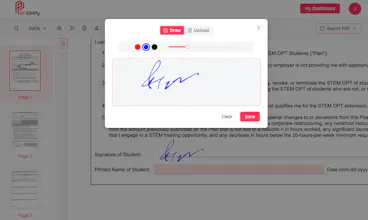
PDF Editify transforms complex PDF management into a seamless experience. We are on a goal to make PDF editing fast, easy and accessible for everyone. Key features: Form Filling E- signatures Smart OCR for perfect text recognition Simple annotation tools (add images, text etc) Permanently redact sensitive information Create fillable PDF forms Conduct surveys or collect data and signatures via PDF forms Collaborative editing for Teams
PDF Editify gallery image
Free Options
Launch tags:ProductivitySaaSOperations
Launch Team
Anima - OnBrand Vibe Coding
Design-aware AI for modern product teams.
Promoted

What do you think? …

Talha Mahmood
Maker
📌
Hello fellow makers: A few months ago, I was in the middle of moving apartments – you know the drill: endless forms, contracts, and a tsunami of PDFs. As I battled through this paperwork nightmare, I discovered the PDF tools I'd been using were either stuck in the Stone Age or had become bloated. So I rolled up my sleeves and decided to create PDF Editify – the editor I wished I'd had during my moving madness. Born from real-world pain and fueled by caffeine, I've obsessed over creating a tool that's fast, intuitive, and actually enjoyable to use. No unnecessary bells and whistles – just pure, unadulterated PDF editing goodness. Think spreading butter on warm toast – that's how smooth I wanted this experience to be. I've meticulously crafted every pixel, click, and interaction because I believe dealing with PDFs shouldn't feel like solving a Rubik's cube blindfolded. PDF Editify is my love letter to everyone who's ever cursed at a PDF (and let's be honest, that's all of us). It's still growing and evolving every week, with user feedback as the secret ingredient making it better. Whether you're signing a lease that'll drain your bank account, polishing up that resume for your dream job, or just trying to wrangle the PDF chaos in your digital life, PDF Editify's got your back. Give it a whirl – your future self will thank you for finding a PDF editor that doesn't feel like it's actively fighting against you. Here's to making PDFs less of a pain and more of a breeze! Because life's too short for bad PDF editors.
ssegar
@talha345 thank you and congrats for launching. Can clarify a bit whats the meaning of ".......that doesn't feel like it's actively fighting against you, making PDFs less of a pain and more of a breeze?" I have used a couple of online and offline editors both free and paid and very curious of what Editify can do that the others can't.
Talha Mahmood
@ilmuku most of the PDF editors out there are bloated with unnecessary features or are quite outdated making even simple tasks such as adding text, images or signatures quite difficult and annoying. Our goal is to make PDF editing easy and accessible to everyone. Most of our users have to work on several PDFs through out the day due to their jobs and when performing a simple task becomes clunky, they get frustrated quite easily. Therefore, we have spent a lot of time and effort designing each feature to give the best user experience to our users. As for features, we are relatively new and launched earlier this year but we are constantly adding new features every month. Some of the features on our roadmap include: - Add Intelligent AI based OCR functionality to make scanned PDFs machine-readable and searchable (launching in January) - Integrate a complete Digital E-signing solution to send and receive documents and contracts for legally valid signatures. - Batch processing of PDFs via different tools - Pre-built forms and templates to fill out and sign - Ability to edit existing text in the PDF
Hiba Zafar
It was very useful and convenient. I really liked it and will surely use in future. THANKYOU!!
zair omer
This is my favorite tool for anything PDF-related. What I find most convenient and useful is the ability to add a signature and share the PDF directly with my HR or management. I absolutely love that feature! other than that it is very simple to use sleek and beautiful.