Launching today

PasteGuard for Mac
Keep secrets and personal data out of AI chats
40 followers
Keep secrets and personal data out of AI chats
40 followers
PasteGuard masks API keys, passwords, emails, card numbers and more on your Mac's clipboard the moment you copy, so every paste into ChatGPT, Claude, Slack or a terminal is safe. An optional Apple Intelligence check on your Mac catches what rules miss. For what only you know, add custom rules, import CSV word lists or keep an Ignore list. Restore puts the real values back. No permissions, no account, nothing leaves your Mac.


Free Options
Launch Team

Dropbox Sign APIBuild eSignatures into your app with less work.
Promoted


Hi Product Hunt 👋
I built PasteGuard after catching myself pasting a production config — database URL, credentials and all — into an AI chat.
The idea is simple: keep sensitive data out of AI chats without changing how you copy and paste.
PasteGuard checks your clipboard locally and replaces sensitive values with placeholders like [API_KEY_1] the moment you copy. So whether you paste into ChatGPT, Claude, Slack or a support ticket, the original secrets stay on your Mac.
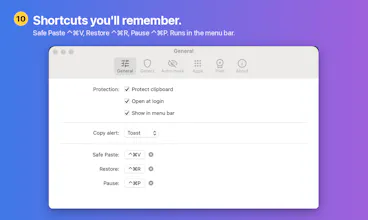
When you need the original values back, press ⌃⌘R to restore them from the placeholders.
• Works across apps, no Accessibility permission required
• Fully local: originals stay in an encrypted vault on your Mac
• Ignore or Mark As when detection gets something wrong
• Pro: custom detection rules and CSV word lists
It's free to download. I'd love to hear what it misses, what it flags incorrectly, or what would make it more useful in your daily workflow!
Can someone put one detail back and leave the rest hidden?
This solves one of those small security risks that's easy to overlook when switching between AI tools all day. Congratulations!
Half the time I copy a key, it's because I'm pasting it somewhere it belongs, like a Vercel env var or a .env file. How does that work here? Do I hit restore every time, or can I tell it certain apps and sites get the real value? Also wondering about clipboard managers: if one saves the original before you mask it, is the secret safe in the paste but still sitting in my history?
@robksawyer Great questions! Thanks for bringing these up.
Pasting keys where they belong: With Auto-mask enabled, PasteGuard masks sensitive values as soon as you copy them. If you need the original for Vercel or a .env file, just select Show Original under Last Copy in the menu, or click Undo on the notification before pasting.
If you work with API keys frequently, you can turn Auto-mask off. Your normal copy and paste stays unchanged, and you can use Safe Paste (⌃⌘V) whenever you want masking, or configure specific apps under Settings → Apps to mask when using ⌘V. Automatic trusted destinations aren't supported yet.
Clipboard managers: This is a valid concern. PasteGuard doesn't store clipboard history, but other clipboard managers may capture the original value before masking takes effect. PasteGuard can't prevent that or remove entries they've already saved.
For now, the safest approach is to configure your clipboard manager to ignore apps where you handle secrets, or use a password manager that marks copied secrets so compatible clipboard managers can skip them.
Really appreciate the thoughtful questions. They're helpful for making PasteGuard better!
congrats on the launch!!!
masking on the way out is the easier half, i think. the model answers talking about EMAIL_1 and DB_PASSWORD_2 and then, i'm the one sitting there mapping it back, which is usually where i give up and stop using the tool.
does restore work on text i copy out of the chat? not matching what i sent, but finding the placeholders inside a reply and swapping them back.
@seenew Thanks! And yes, Restore works on text you copy out of the chat, even if the reply looks nothing like what you sent. It scans for placeholders PasteGuard created and swaps the originals back, including repeats and placeholders inside code blocks.
Just copy the reply and press ⌃⌘R, or choose Restore Originals from the menu. Originals stay local and are kept for 24 hours by default. I tested this on a Mac with [EMAIL_1], [DB_URL_1], and [API_KEY_1], and all three came back correctly throughout the reply.
One catch: placeholders currently have to match exactly. [EMAIL_1] works, but EMAIL_1 or [email_1] won’t, so if the model drops the brackets as in your example, Restore will miss it. I’m looking into handling dropped brackets, changed capitalization, and Markdown escaping, while still only restoring values from your local vault.
Appreciate the clear explanation of what happens when an AI changes a placeholder. Making any unrestored placeholders obvious before copying the reply would help avoid a confusing result.
@oleksii_sekundant Thanks for the thoughtful suggestion! That's a great point. I'm considering adding a warning when Restore detects possible unresolved placeholders, so users can catch them instead of being left with confusing results. Really appreciate the feedback!
the ignore list matters almost as much as the detection here
clipboard tools get frustrating fast if ordinary copying turns into a cleanup job every time