
panoma
Local catalog of your projects — for you and your agents
3 followers
Local catalog of your projects — for you and your agents
3 followers
Point panoma at a folder and it catalogs every project on your disk: stack, health, what's broken, the work you never pushed, and which AI agent signed which commit. It runs entirely on your machine — no account, no server, nothing uploaded. Pull the wifi and scan again: same catalog. Your agents read that same catalog over MCP, so what one learns, the next one gets. Open source, AGPL-3.0.




Free
Launch Team / Built With


ClarifyThe full-stack AI CRM for modern GTM teams
Promoted
Hey Product Hunt 👋
I built panoma because I kept putting off shutting down my laptop: turning it off meant losing the thread, and picking things back up later cost more than just moving forward.
We were always told to focus on one project. That was before agentic coding. Today, an idea doesn’t go into a notebook anymore — it becomes an MVP in an afternoon, and you come back to it when its moment arrives. Out of a hundred projects, maybe five will work — but to find out which ones, you have to build them. What’s missing now isn’t focus. It’s the panoramic view.
I had more than forty project folders, some of them forgotten, and I couldn’t tell you which ones still compiled or which ones I had never pushed. GitHub only knows what you pushed. My editor opens one project at a time. There was no front door.
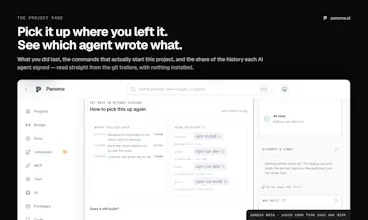
So I built one. npx panoma up ~/Dev reads that folder — or your entire disk, or just one — without installing anything or uploading anything, and gives you a catalog: stack, health, what’s broken, the commits that never left your disk, and which AI agent signed each commit (it reads the Co-Authored-By trailers, so that works without connecting anything).
You no longer have to read code to know how your projects are doing — you can see it. And when you pick one back up, its page remembers where everything lives, down to the accounts, and one click opens it in your agent.
The part I care about most: it’s open source (AGPL-3.0) and it runs locally. No account, no server. Turn off Wi-Fi and scan again — same catalog. The only thing that leaves your machine is the public name of a package when panoma checks npm; whatever you discuss with your agents goes to your provider, not to panoma.
So tell me: how many projects are you building right now? Drop the number in the comments — if it’s more than two, panoma was made for you.
That’s why it exists: to make managing many projects cheap.
— Jesus Castillo. I’m building this solo in New York. By day, I drive rideshare while I look for the project that works. Maybe it’s this one — try it, and if you like it, help me make it better.