
Padoo Trackpad
Your iPhone as a trackpad, air pointer and deck for Mac
2 followers
Your iPhone as a trackpad, air pointer and deck for Mac
2 followers
Padoo turns the iPhone already in your hand into three controls for your Mac: a familiar trackpad, an air pointer you aim like a remote, and a customizable deck of glass keys for apps and actions. It works with a free Mac companion and pairs in one QR scan; after that the two reconnect automatically over the best local link. No account, no servers, and no subscription. Try it free for three days, then it’s $9.99 once.



Free Options
Launch tags:Productivity
Launch Team

ClarifyThe autonomous CRM that helps you sell more
Promoted
Hi, I'm Tal 👋
I built Padoo because I love apple's trackpad but it lacks some features IMO and i also wanted to give it a personal touch and personalization.
Padoo turns the phone into three different input surfaces for a Mac:
1. A trackpad with the familiar gestures: tap to click, two fingers to scroll or right click, pinch to zoom, tap and drag, and 3 finger swipes between desktops.
2. An air pointer you can aim at the screen like a TV remote (useful if your like me giving presentations or watch tv with you mac connected) .
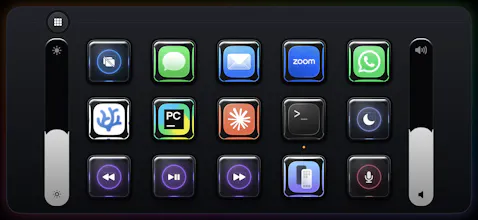
3. A (very) customizable deck of glass keys for opening apps and running actions on the Mac (with per app gestures support).
On my setup, the direct wireless path takes about 2ms from receiving the touch event on the phone to posting the input event on the Mac. That measurement does not include either display's latency.
The deck is the playful part. You build it from the Mac by dragging apps and actions onto keys. Each key can respond to a tap, a hold, or a flick in four directions, so the same app key can do several useful things without turning the phone into a wall of tiny buttons.
A lot of the visual side is personalizable too: you can choose the trackpad’s look, tune the glass effect, arrange the deck, and choose which apps appear along the trackpad’s edge (you can see examples on the website!).
Setup is one QR scan. After that, the iPhone and the free Mac companion find each other automatically and use the best available local connection: a cable, a direct phone to Mac wireless link, or the normal WiFi network.
Everything stays between those two device and there is no account, sign-in, analytics, or server. Pairing keys are stored in the keychain and each session is authenticated.
Padoo needs iOS 18 and macOS 15 or later. It is free to try for three days, then $9.99 once, with no subscription. The Mac app is free ofc.
I would love to hear what you think, especially which of the three modes you would actually use and what you would want a phone sized Mac controller to do next.