
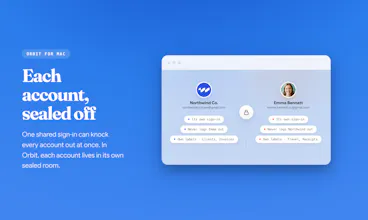
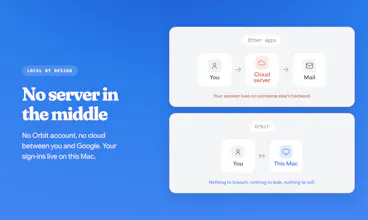
Every Google account in its own room on your Mac, fully isolated. Each one is the real Gmail web UI, with Calendar, Drive, Meet, and Gemini. No server, no subscription: pay once ($19 launch price, $89 after). Switch with ⌘1-9. Native Swift, a 12 MB app. 14-day free trial, no card needed.




Payment Required
Launch Team

Dropbox SignSimple, secure eSignatures for the way your team works.
Promoted
The no-server trade-off is good product honesty. For multi-account work on a Mac, isolation is usually more valuable than clever sync, especially when support/client mail can leak across contexts. The detail I would want next is per-room notification rules and a clear recovery path when Google changes a WebKit login edge case.
@krekeltronics Thank you, Patrick. That is exactly the trade-off I wanted to be honest about. Per-room notification rules are already partly there: each account has its own unread badge, and you can mute notifications per account. I agree the next step is making those rules more explicit and easier to manage.
For Google/WebKit edge cases, the current recovery path is intentionally local: if a Google sign-in flow breaks, the account can be retried or re-added without touching the other rooms.
the ⌘1–9 switching between isolated Google accounts feels so much faster than juggling browser profiles, and 12 MB native Swift is genuinely impressive for something running the full Gmail UI
@sebahat2cva Thank you, Sebahat. That's the whole point. Each account keeps its own room loaded in the background, so ⌘1-9 usually drops you straight in instead of reloading a profile from scratch. And the 12 MB comes from using macOS's own WebKit engine instead of bundling a second browser, which is also why the full Gmail UI just works. Glad it landed for you.
a 12MB native Swift app pulling this off instead of another Electron wrapper is the detail that sold me, most multi-account tools are 200MB+ and still route your session through their servers like you mentioned. one-time payment for something this narrowly useful also feels right, this isn't a tool that needs a subscription to justify ongoing dev cost
@omri_ben_shoham1 Thank you, Omri. You nailed it. Electron would have been the easy path, but bundling a second Chromium just to show a webpage drags the size and the server dependency along with it. Native was harder to build, and that's precisely why it stays this small and this fast. Worth every bit of the extra work.
Love the idea. It would be great to sync account settings and credentials through iCloud - set everything up once, then use/restore it on two Macs.
@alex_gerasymenko Thanks Alex, that’s a good idea. For the current version, I’m keeping Orbit local-first on purpose. The main focus is strong account isolation, with each Google session staying on your Mac and no extra sync layer in the middle. I’ll keep this in mind as I think about future versions.
Looks amazing! Any plans to support other Google Apps such as Maps and/or Business?
@rustykr Thank you! The core today is Gmail, Calendar, Drive, Meet, Gemini, Docs, Sheets, Slides, Forms, plus a Web tab.
For the long tail like Maps or Google Business, the Web tab is the path for now: it runs inside the same isolated account session, so you can open those Google pages without jumping to another browser profile. I am being careful not to turn Orbit into “another full browser,” but if enough people use Maps/Business daily, they are natural candidates for first-class tabs.
A great idea, and something I badly need, but the app keeps crashing when I press the “Add Account” button.
@cronberry Thank you for flagging this, Jonathan. That should not happen.
Could you email me at support@orbitformac.com with your macOS version and what you see right before the crash? I’m checking the Add Account path right now and will prioritize a fix.
@andrewbuilds Done!
@cronberry Thank you, Jonathan. Your recording helped me find it.
It was a first-run Add Account crash before the Google sign-in window opened. I just pushed a hotfix to the same download link: https://orbitformac.com/download
Please download it again, replace the app, and try Add Account once more. I also replied by email.
@cronberry Update for anyone reading: Jonathan confirmed by email that 1.0.2 is working perfectly for him now. The crash was a first-run packaging bug in 1.0.0, fixed the same day, and old download links now redirect to the current build so nobody can land on the broken one. If you hit anything at all, email support@orbitformac.com and I'll be on it.
Native Swift at 12 MB and no server dependency, that's real respect for the Mac platform. Love that you kept the actual Gmail web UI intact instead of rebuilding it poorly.
@zekiye142389 Thank you, Zekiye. That respect goes both ways. macOS already ships a great WebKit engine, so bundling a second browser just to show Gmail never made sense to me. Keeping the real Gmail UI was the whole point. Glad it resonates.