Launching today

OpenCompanion
Start, watch and answer AI coding CLIs from one desktop app
11 followers
Start, watch and answer AI coding CLIs from one desktop app
11 followers
When you run Claude Code, Codex CLI or OpenCode in several folders at once, each session stops now and then to ask for permission, and you only find out when you look at its terminal. OpenCompanion starts those sessions, lists them on one screen, tells you when one is waiting, and lets you answer from the desktop or from your phone on the same Wi-Fi. No account, no cloud server, no telemetry. Open source (MIT), for Windows, Linux and macOS.


Hi Product Hunt,
OpenCompanion is for people who run AI coding CLIs in more than one project folder at a time. Each session stops now and then to ask for permission, and you only find out when you look at its terminal.
What it does today:
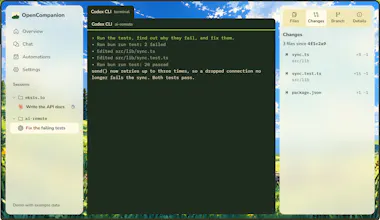
- Starts Claude Code, Codex CLI, OpenCode and a few other CLIs in a real terminal or headless, and lists every session on one screen with its status and latest event.
- Tells you when a session is waiting for you. Claude Code permission prompts get Approve and Deny buttons, on the desktop and on your phone over your own Wi-Fi.
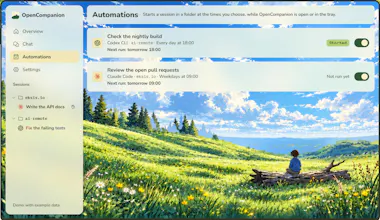
- Chat turns a plain request into one card per session. You read each prompt, then press Run. Ask for work that repeats and you get an automation that starts on a schedule.
- Beside each session you can split a shell to run the tests, browse the folder and read the uncommitted diff.
It all runs on your computer: no account, no cloud server, no telemetry. Each CLI keeps using your own login and quota.
Where it stands: installers for Windows, Linux and macOS are on opencompanion.vercel.app and GitHub Releases, or you can build it from source. They are not code-signed yet, so the first start asks you once to allow it. Windows gets tested by hand every day, Linux end to end in Docker, and macOS so far only builds and passes its tests in CI. The phone link is plain HTTP on your local network, so use a VPN such as Tailscale when you are away from home.
It is MIT licensed. Which CLI do you run the most, and what would you want OpenCompanion to catch for you?
You mention the phone link is plain HTTP on the local network. Is there a pairing token, or can anything else on the same Wi-Fi press Approve? On a shared office network that's the part I'd want to know.