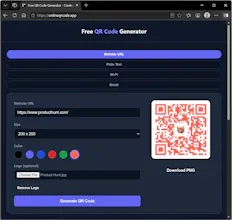
A free QR code generator for URLs, text, Wi-Fi, and email — with your own logo embedded right in the code. Pick from 5 preset colors or a custom color, upload a logo, generate, and download as PNG in seconds. Everything runs in your browser: no account, no watermark, no expiration.
No reviews yetBe the first to leave a review for Online QR Code Generator
Maker
📌
Hey Product Hunt! 👋
I built this because most free QR code tools either watermark your download, require an account, or don't let you brand the code at all. This one does none of that — pick from 5 preset colors or your own custom color, upload a logo to embed in the center (auto-sized and padded so it stays scannable), and download a clean PNG. Everything runs client-side in your browser, so nothing you enter ever touches a server.
Currently supports URLs, plain text, Wi-Fi credentials, and email. Would love feedback on what to add next (thinking vCard / contact cards).
Free forever, no sign-up required. Let me know what you think!
Report
💡 Bright idea
Would love to see a vector SVG download option alongside the PNG. Useful for keeping the code crisp when scaling it up for print materials, and way nicer for designers working on branding projects.
Report
Maker
@lhancltm Thank you for the idea, I will add that feature into the next release.
Report
Maker
@lhancltm The feature is now live. Please try again and let me know if there is any issue. Thanks again for providing feedback. I've also added a "Share" button for sharing the generated QR-code directly with other apps via the standard share menu without downloading the image to the device first and then opening another app, then upload the image....
Would love to see a vector SVG download option alongside the PNG. Useful for keeping the code crisp when scaling it up for print materials, and way nicer for designers working on branding projects.
@lhancltm Thank you for the idea, I will add that feature into the next release.
@lhancltm The feature is now live. Please try again and let me know if there is any issue. Thanks again for providing feedback.
I've also added a "Share" button for sharing the generated QR-code directly with other apps via the standard share menu without downloading the image to the device first and then opening another app, then upload the image....