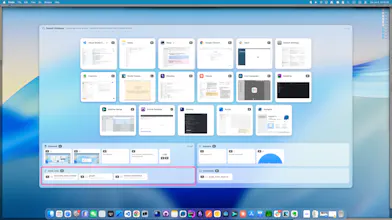
Switch to any window from the keyboard — no Enter key. App grid → window grid in two keystrokes, with stable numbers that become muscle memory. Clipboard history, snippets, and quick links live in the same hotkey. Native, GPL-3.0, one-time purchase.

No reviews yetBe the first to leave a review for OmniSwitch
Maker
📌
Hi Product Hunt 👋 I'm the maker of OmniSwitch.
This started as a personal itch: all day I was bouncing between ⌘Tab, a clipboard manager, and a text expander — three tools, three muscle memories. I wanted one hotkey for the whole thing, and I wanted to never press Enter to confirm a choice.
So OmniSwitch works like this: hit your hotkey → a grid of your apps, each with a letter → press it. One-window apps jump straight there; multi-window apps fan out into a grid of windows you pick by number. The numbers are stable per window, so it turns into real muscle memory instead of a guessing game. The same overlay holds your clipboard history, snippets, and quick links — V/B/Q + a number and it's pasted or opened. Keyboard or mouse, your call.
Two things I care about being upfront on:
- It's native (SwiftUI + AppKit, no Electron) — light and instant.
- It's GPL-3.0 open source, on purpose: it needs Accessibility + Screen Recording + clipboard access, and you should be able to audit anything that asks for those. Your clipboard/snippets/links never leave your Mac.
It's a one-time purchase (no subscription) with 200 free invocations to try. For Product Hunt, it's launch week early-bird $7.99 (regular $12.99) — and if you grab it at that price, it's locked in for you; later increases only touch new customers. One license covers 3 Macs and works fully offline once activated.
I'd love your honest feedback — especially edge cases (multi-display, Spaces, weird apps). Reply here and I'll answer everything today. 🙏
Source (GPL-3.0): https://github.com/Hexor/OmniSwi...