As one of OLVA's co-founders, I'm obviously biased—but I'm also one of its heaviest users. I rely on it every day for customer calls, product discussions, hiring interviews, investor meetings, and even in-person conversations.
We built OLVA because we experienced the same frustration as everyone else: trying to stay engaged in a conversation while taking notes, remembering important details, finding answers, and thinking about what to say next. Existing tools did a great job of documenting meetings afterward, but very little to help while the meeting was actually happening.
That's why OLVA is designed to be an invisible AI companion, not just another note-taking app. It works quietly in the background without adding a bot to your meetings, providing real-time transcription, automatic question detection, instant contextual answers, live insights, and AI coaching while the conversation is still in progress.
One feature I personally use all the time is asking OLVA questions during meetings. Whether I need to recall something mentioned earlier, clarify a technical concept, or quickly verify information, I can get an answer without interrupting the flow of the conversation. After the meeting, everything is already organized into summaries, action items, Sticky Notes, and a searchable meeting memory that I can chat with later.
The most rewarding part has been seeing people use OLVA in ways we never initially imagined—from sales calls and customer meetings to interviews, podcasts, language learning, and in-person conversations. That's when you realize you've built something that's more than a meeting recorder—it's a true AI companion for conversations.


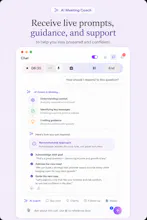


👋 Hey Product Hunt!
I'm excited to introduce OLVA — your invisible real-time AI meeting assistant.
Most AI meeting tools help after the meeting. They join your calls with bots, record everything, and generate notes once the conversation is over.
OLVA takes a different approach.
It works silently in the background during your meetings, helping you when you need it most:
✅ Detects questions automatically
✅ Provides instant answers in real time
✅ Offers live AI coaching and insights
✅ Works with Zoom, Meet, Teams, and even in-person meetings
✅ No bots joining your calls
✅ No interruptions to the conversation
Whether you're in sales, customer success, leadership meetings, interviews, or technical discussions, OLVA helps you think faster, respond with confidence, and never miss important moments.
We built OLVA because we felt there was a gap between AI note-taking tools and true real-time meeting intelligence. We wanted an assistant that helps while the meeting is happening—not after it's over.
We're launching today and would love your feedback:
• What use case excites you most?
• What would make this indispensable for your workflow?
• What features would you like to see next?
Thanks for checking out OLVA. Looking forward to hearing your thoughts and answering any questions! 🚀
— The OLVA Team
How does it actually work without joining the call as a bot? Does it run locally on my device or does it need access to the meeting audio feed somehow?
@enaywp7v You don't need any thing else as it captured all audio played on your system. The app just needs audio capture permission on your system to work, which asks you for permission when it gets installed
How does it actually pull answers live without joining the call as a bot, is it reading my audio feed or something else?
@bedriyet6sw It captures system audio, meaning all audio playing in your system, it means that you can use it with any possible meeting app, or even use it with podcast, or any other audio playing app for other purposes like learning a language. Imagine you are watching a French movie for learning the language, then you can pause it and ask any question in french or in your first language and OLVA answer it for you, isn't it interesting?
finally tried olva during a client call and the no-bot thing is a game changer, feels way less invasive than other tools i've used
@yalnaksundshw Thanks so much! That was exactly one of the reasons we built OLVA—we wanted AI to help without changing the dynamic of the conversation.
We've also added quite a few new features recently that you might enjoy:
iOS and Android apps for on-the-go and in-person conversations
Sticky Notes to quickly save important moments during a meeting
Editable meeting summaries
Automatically create Sticky Notes from action items in your summary
Improved multilingual support across 87 languages and regional variants
If you get a chance to try the new features, we'd love to hear what you think. Thanks again for giving OLVA a shot!
how does it pick up audio without actually joining the call as a bot?
@farukbalinan OLVA simply captures two audio sources: your microphone and your system audio. That means it's useful for much more than just meetings. You can use it to practice a new language, better understand podcasts or online courses, analyze conversations, or gain insights from virtually any audio. The possibilities are endless.