
Offline PDF & Image Redactor
Stop uploading confidential files. Redact PDFs locally.
4 followers
Stop uploading confidential files. Redact PDFs locally.
4 followers
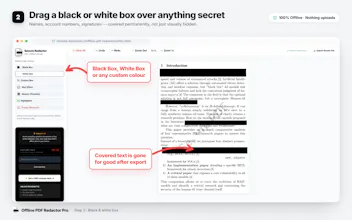
Most online PDF tools require uploading confidential documents to external servers. Offline PDF & Image Redactor keeps everything on your device. Redact sensitive text, blur private information, and securely hide confidential data in PDFs and images without ever uploading your files. Fast, lightweight, privacy-first, and works completely offline inside your browser.




Free
Launch Team / Built With


AWS Startup AdvisorPersonalized AWS guidance that meets you where you’re already building
Promoted
Love that this stays fully offline, exactly what I need for work. One thing that would make it even better is adding the ability to save custom redaction patterns or blacklisted terms so they auto apply across multiple files in a batch, saves a ton of repetitive clicking when reviewing big document sets.
@wyatt_cai Thanks for the great suggestion, Makiya! We’ve just pushed an update that adds word-based redaction, so you can enter a word or term and automatically redact every occurrence across the PDF.
Give it a try when you get a chance we’d love to hear what you think!