Launched this week

OctoTrack Studio
The 8-track tape machine your Mac always wanted to be.
6 followers
The 8-track tape machine your Mac always wanted to be.
6 followers
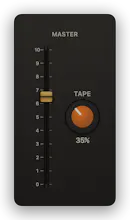
Remember the Tascam 244? That four-track feeling reborn as an 8-track Mac app: destructive recording on purpose, ping-pong without the hiss, one amber TAPE knob. Not a DAW: no timeline, no plugins. 14-day free trial. Then $19.99 once, no subscription.



The TAPE knob obsession is real love, glad someone finally ditched the timeline approach. One thing that would make this stick for me: a simple stereo bounce to disk with a couple of mix options like "clean" vs "tape saturated," so I can share a track without needing to import it somewhere else first. Would round out the whole lo-fi-to-real-world handoff nicely.
@eleanor_belgraveΒ Thank you, Eleanor β "ditched the timeline" is the whole pitch, so I'm glad that landed.
That handoff is already in there: Export Mix (βE) renders your mix offline straight to disk β WAV 24-bit/48 kHz or AAC 192/256/320 β and it prints exactly what you're hearing, faders, pan, EQ, varispeed pitch and the TAPE knob included. Nothing to import anywhere else.
So both of your versions are one panel away. Export once with TAPE where you like it β that's your saturated mix. Then double-click the knob to send it to 0 (at 0 the path is bit-exact dry, no "almost clean" about it), export again, and dial the knob back to where it was; it reads out in percent right under it, so you're not eyeballing your setting to get it back.
One thing worth knowing, since it's the opposite choice: internal ping-pong bounces (βB) never print TAPE. That's deliberate β bouncing tracks down shouldn't stack saturation generation over generation. The knob only prints on the final mix export, which is where you want it.
Give it a try!