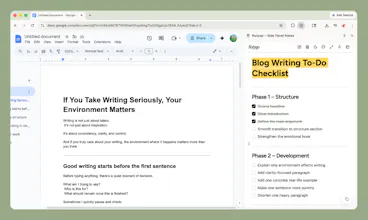
Notyqo is a Chrome extension built for the native side panel: notes stay next to the page — no new tab, no full-screen takeover. Quick Note for fast capture; a proper rich editor when a note grows up — lists, code, links, real formatting. Local-first, personality palettes for vibe, auto-save. A calm way to work in the browser without spinning up another doc factory.
Hey Product Hunt 👋 I’m Dedieu, the maker of Notyqo.
Quick origin: it started as a stubbornly simple idea—notes in Chrome’s side panel so you could capture something without opening another tab or losing the page you were on. The more I lived in that flow, the more the product argued back: sometimes you need full screen to think straight, and a few small tools next to the same habit started to feel obvious instead of “extra apps.”
So Notyqo grew into one lightweight companion: side panel for speed, full editor when a note gets serious, and utilities that stay in the same rhythm—not a second workspace to babysit. Notes are local-first by default; cloud sync is there when you go Pro. The polish is in the personality palettes and steady auto-save so it actually feels good to open every day.
A few choices I care about:
🧭 Context first — capture stays beside the tab you’re in, not on top of it.
✍️ Real structure when you need it — lists, code, links; not a toy textarea.
🧠 Utility over ceremony — built to nudge productivity a little, not run your life.
I’d love your takes: what would make Notyqo a daily driver for you, and what feels missing on day one? I’ll be here to answer questions.
Report
Maker
Good day, Will be a good day.
Report
No reviews yetBe the first to leave a review for Notyqo – Side Panel Notes
Good day, Will be a good day.