
Notion Mobile
Notes, docs & tasks—organized anywhere, anytime.
6 followers
Notes, docs & tasks—organized anywhere, anytime.
6 followers
Notion Mobile puts docs, notes, and tasks right in your pocket. Capture ideas, stay organized, and collaborate on the go—whether you’re offline or online. It’s the all-in-one workspace, built for mobile.


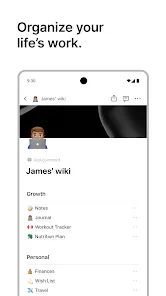

The best part of Notion Mobile? I no longer email myself random midnight thoughts. 😅 Quick capture makes life so much easier. Whether it’s a grocery list or a half-crazy idea for a side project, I can jot it down and trust it’ll sync everywhere. And yes, offline mode is a lifesaver when traveling. I think productivity apps should feel like helpful friends, not strict teachers. That’s why we focused on making it light, flexible, and inviting. Personally, I use it for both serious project planning and silly daily notes. That balance is what makes it fun.
Notion Mobile is about practicality. Sometimes you don’t need a thousand features—you just need a way to capture a thought, check a to-do, or look up a project update. That’s why quick capture is my favorite feature. Open the app, type, close it. Later, you can organize it in databases or link it to bigger projects. The beauty of Notion is flexibility, but flexibility only matters if the basics are fast. Dark mode, templates, search, filters—they’re all here, but the app doesn’t force them on you. To me, the real success is when someone opens Notion Mobile at 3 a.m., types a single line, and feels relieved knowing that idea won’t be lost. That’s productivity without friction.
I’ll admit it: I made this app partly because I needed it. I was tired of juggling different apps for notes, tasks, and docs. Now, everything lives in one place, right in my pocket. I can plan dinner, manage a project, and draft a blog—all in Notion Mobile. The sync works so well that I never worry about version issues. I use it daily, and I think others will too. It’s not about being fancy; it’s about making life simpler.
As a designer, I obsessed over the small details here. On mobile, screen space is limited, so everything had to feel effortless. Button placement, gestures, typography—we tested them again and again. I wanted users to focus on content, not controls. My favorite little detail is the quick-add button: always there, never intrusive. We also worked hard on readability, making sure text feels clear and pages load without clutter. Design isn’t just about looks; it’s about reducing mental effort. If you don’t notice the design, that means we did it right.
This launch is just step one. We wanted to give people a strong foundation: offline support, task management, databases, real-time sync. But we’re already thinking ahead. Smarter search, better filtering, deeper integrations—these are on the roadmap. Our philosophy has always been to build with the community, not just for them. That means your feedback will shape every update. We don’t measure success only in downloads; we measure it in daily use. If Notion Mobile becomes part of how you study, plan, or run your team, then we’ve succeeded. For us, the excitement isn’t just today’s launch—it’s the journey that begins here.
This app is more than software—it’s about freedom. The future of work is mobile-first, flexible, and borderless. We didn’t want Notion Mobile to feel like a stripped-down version of desktop; we wanted it to be a powerful hub in its own right. Imagine writing a draft while traveling, updating your team from a park, or planning your week during a coffee break. That’s the lifestyle we designed for. Every detail—offline mode, fast sync, custom templates—supports this idea of flexibility. Personally, I love the idea that people in different corners of the world, with completely different routines, can still rely on the same tool. To me, that’s inspiring. Productivity shouldn’t be tied to location or device. It should move with you, like your thoughts do.