Launching today

MyLocal
stops the dev servers left running all night
2 followers
stops the dev servers left running all night
2 followers
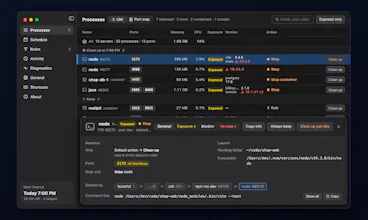
Computers don’t sleep at night anymore. MyLocal, a free macOS menu bar app, warns you and stops dev servers left running after work. No root, and the app sends nothing out.


Free
Launch Team

Dropbox Sign APIBuild eSignatures into your app with less work.
Promoted
Hi Product Hunt, I'm a backend developer.
I recently had info-stealing malware installed on my Mac. Later, while developing a server, I noticed connections to it from outside. I wanted to tighten this up, and that started with knowing what was actually open on my machine. So I built a tool to see it. That tool is MyLocal.
To be clear about what it is not: it doesn't detect or block malware, it doesn't show who connected to a server, and it isn't a vulnerability scanner. It wouldn't have stopped the malware I ran into. It shows which dev servers are reachable from outside, and stops the ones you forgot about.
lsof can show open ports, but only at the moment you check. MyLocal also shows what started a server and why it's exposed, and keeps finding new servers after work hours.
Once you find an open server, the next question is whether it's on an unsupported version. MyLocal colors end of support, new patches and known security advisories, and you can ask an AI agent like Claude Code what an advisory means. The colors only inform you: they never make MyLocal stop a server.
What it does:
- Lists open servers with their ports, whether they are local or exposed, and what started them (terminal, IDE, launchd, pm2, Docker)
- If a command-line option or Docker port setting opened a port, shows that setting and how to change it. If code, an environment variable or a config file did, it can't tell the cause and only points to where to look. It won't edit your files, but it can copy a request for your coding agent
- Shows tunnels from ngrok, cloudflared, localtunnel, ssh -R and Tailscale Serve and Funnel
- Reads running versions without executing the programs and compares them on your computer with public data it downloads, to flag end of support, new patches and known advisories. It isn't a vulnerability scan, and having no flag doesn't mean a server is safe
- When work hours end (weekdays 9 to 19 by default), warns you and stops exposed servers. You can snooze up to 3 times. New servers that appear overnight are found within 30 seconds, then warned about after 10 minutes and stopped 5 minutes later
- Stops each server the way it was started, including nodemon, brew services, Docker containers, pm2 and supervisord. It never restarts anything
- With the mylocal CLI and its skill, you can ask an AI agent like Claude Code what's running, why it's exposed, what a security advisory says and which version fixed it. The agent can change schedules and rules, but stopping and snoozing servers stay in the app. The command output may go to that AI service, with secrets masked
What you can see on the website:
- Home: https://mylocal.myiam.io/en/
- How long servers stay open on nights the computer stays awake: https://mylocal.myiam.io/en/#night
- The difference between 127.0.0.1 and 0.0.0.0: https://mylocal.myiam.io/en/#why
- What MyLocal does through the day: https://mylocal.myiam.io/en/#day
- How it stops a server depending on what started it: https://mylocal.myiam.io/en/#stop
- What it never stops, the check right before stopping, and what it can't do: https://mylocal.myiam.io/en/#safety
- What running without root, on your own account's permissions, covers: https://mylocal.myiam.io/en/#no-root
- Version colors and example questions for an AI agent: https://mylocal.myiam.io/en/#versions
- What the app handles and what it downloads: https://mylocal.myiam.io/en/#privacy
- A tour of the app screens: https://mylocal.myiam.io/en/#tour
- The CLI and the AI agent skill: https://mylocal.myiam.io/en/#cli
- Questions: https://mylocal.myiam.io/en/#faq
- How to install: https://mylocal.myiam.io/en/#download
It only records what it would stop until you turn cleanup on. It runs with your own account's permissions, and system services, VPNs and the Docker runtime can't be stopped by any setting. There is no account, and the app has no analytics or crash reporting. It only downloads update and support data from GitHub, and you can turn that off. The website is separate from the app and uses Google Analytics to count visits.
What it can't do yet: it doesn't see UDP or outgoing connections, and it can't find tunnel tools it doesn't know. It also doesn't check your project's full dependencies. Known advisories cover runtimes, servers and some frameworks.
It's for developers who run local servers. Today it runs on Apple silicon Macs with macOS 13 or later, and a Windows version is in the works.
The current version is free for personal and work use, with no contract needed. A paid, extensible enterprise version that can be adapted to your organization is in the works. It is a separate program offered under a separate contract, and its release date and features are not decided yet.
Please leave your feedback in the comments or on GitHub. The repository is for feedback and reports, and the source code isn't public.
https://github.com/my-locals/mylocal
Thank you.