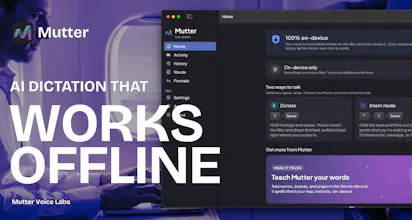
Speak the rough thought and Mutter shapes it into finished writing right where you type, about 3x faster than typing. A 100% on-device mode keeps sensitive words on your Mac.
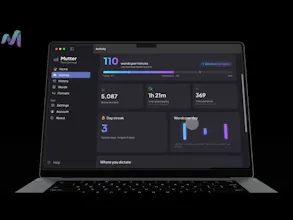
I started dictating instead of typing and basically never went back. It's how I get thoughts out of my head now and into a doc, a Slack, an email. I can't really work without it anymore.
Two things kept bugging me though.
The first was privacy. I was talking through contracts, half-formed ideas, stuff about my team, and shipping all of it to someone else's servers to get transcribed. The more I leaned on it, the more that bothered me. I wanted a version where the sensitive stuff just never left my machine. So that's the first thing we built. Mutter has a fully on-device mode. Turn it on and your audio is transcribed locally and never uploaded. You can run it with wifi off and it still works.
The second was that these apps clean up what I said, but they don't get what I was trying to do. I'd ramble "reply to Josh, deck looks good, cut slide four" and get back a clean transcript of exactly that. Useful, but I still had to go write the actual email. I wanted it to read the context and hand me the finished thing.
So Mutter has two modes, both always on. Dictate is the simple one. You talk, it writes clean text, no inference, no surprises. You don't want a model second-guessing you when you're just taking notes. Intent mode is the other one. You riff, and based on what you're doing, Mutter writes what you actually meant.
That's the whole thing. Private when it counts, and it finishes the thought instead of just transcribing it.
Would love feedback, especially on Intent mode. It's the part I'm most excited about and the part I most want to get right.
Report
@steven_billings How much control do you want over what stays on-device vs. what’s sent to the cloud? Would you trade any convenience for stronger privacy guarantees?
@swati_paliwal Great questions! There are multiple controls for what goes to cloud and what stays on device - they are driven by capability. I think we are pretty explicit in the App Settings. There is a full private mode that keeps everything on device and for using offline. However, the settings explain which features require cloud mode to access a more powerful LLM. But we try to make that really clear to the user whenever they're using cloud mode versus private mode. Would love your feedback though!
Report
Congrats on the launch! What other languages does it support other than English? Does it perform well in noisy environement?
@ashishkingdom Our cloud mode has an auto-detect for language and can support over 100 languages natively. The private, on-device mode currently supports Bulgarian, Croatian, Czech, Danish, Dutch, English, Estonian, Finnish, French, German, Greek, Hungarian, Italian, Latvian, Lithuanian, Maltese, Polish, Portuguese, Romanian, Russian, Slovak, Slovenian, Spanish, Swedish, and Ukrainian.
Report
@ashishkingdom@steven_billings The on-device mode is the part that caught my attention. I’m curious how much of the everyday value is available if someone stays fully local all the time. Do you think of private mode as the main experience, with cloud mode as an optional boost, or are there workflows where cloud mode becomes essential?
@sourabh_kapure Handy's genuinely good for anyone looking for a free/open-source grade option. The difference is what comes out: Handy gives you the ability to speak into any text field. Good start, but we wanted more. Mutter gives you the finished writing with filler stripped, formatted, and Intent Mode reshapes a rough thought into a send-ready email/message/prompt before it pastes. And it's also has the full on-device in private mode when you need it. Mutter also does instant translation at the same time into dozens of languages. Different philosophy on models (we're opinionated vs. swappable). Room for both 🙏. We think people will like Mutter as an upgrade over Handy.
Report
The split between Dictate (clean transcript) and Intent mode (writes what you actually meant) is smart — most dictation tools force one behavior and you end up fighting it. As someone who rambles ideas out loud while building, Intent mode sounds like the one I'd live in — does it pull context from the app/window I'm in, or just from what I say? On-device privacy is a real selling point.
@lennoxbeflying Intent mode has several context settings and profile settings it pulls from to help generate just what the user is looking for! Thanks for the feedback and comment!
Hey@mattyyyy ! Intent mode is intelligent dictation. You know how you'll have an idea and just blurt it out, but it comes out kind of a mess and you still have to go turn it into a real email or message? That's what Intent mode handles. One hotkey gives you straight dictate mode, which just simply cleans up what you said and inserts it. But another hotkey gives you intent mode.
You hold a key, talk it through however it comes out of your head, and it figures out what you were actually trying to make. Could be an email, a Slack message, a task list, a quick memo. Then it gives you the cleaned up version to look over before it goes in.
So you do the thinking-out-loud part, and it does the part where you'd usually have to stop and make it sound right.
Lifetime Launch offer for our PH community: we're selling 300 founding licenses at $179 one-time, lifetime access to everything including the fully on-device Private mode. After 300, it's subscription only. Grab one here: https://muttervoice.com/pricing
Happy to answer anything about Intent Mode or how the private, on-device pipeline works.
Rooftops AI
@steven_billings How much control do you want over what stays on-device vs. what’s sent to the cloud? Would you trade any convenience for stronger privacy guarantees?
Rooftops AI
@swati_paliwal Great questions! There are multiple controls for what goes to cloud and what stays on device - they are driven by capability. I think we are pretty explicit in the App Settings. There is a full private mode that keeps everything on device and for using offline. However, the settings explain which features require cloud mode to access a more powerful LLM. But we try to make that really clear to the user whenever they're using cloud mode versus private mode. Would love your feedback though!
Congrats on the launch! What other languages does it support other than English? Does it perform well in noisy environement?
Rooftops AI
@ashishkingdom Our cloud mode has an auto-detect for language and can support over 100 languages natively. The private, on-device mode currently supports Bulgarian, Croatian, Czech, Danish, Dutch, English, Estonian, Finnish, French, German, Greek, Hungarian, Italian, Latvian, Lithuanian, Maltese, Polish, Portuguese, Romanian, Russian, Slovak, Slovenian, Spanish, Swedish, and Ukrainian.
@ashishkingdom @steven_billings The on-device mode is the part that caught my attention. I’m curious how much of the everyday value is available if someone stays fully local all the time. Do you think of private mode as the main experience, with cloud mode as an optional boost, or are there workflows where cloud mode becomes essential?
How is this different from handy.computer ?
@Handy does the same thing for free + open-source.
I can also select models taht I want. Completely local.
Would love to know your thoughts on this.
Rooftops AI
@sourabh_kapure Handy's genuinely good for anyone looking for a free/open-source grade option. The difference is what comes out: Handy gives you the ability to speak into any text field. Good start, but we wanted more. Mutter gives you the finished writing with filler stripped, formatted, and Intent Mode reshapes a rough thought into a send-ready email/message/prompt before it pastes. And it's also has the full on-device in private mode when you need it. Mutter also does instant translation at the same time into dozens of languages. Different philosophy on models (we're opinionated vs. swappable). Room for both 🙏. We think people will like Mutter as an upgrade over Handy.
The split between Dictate (clean transcript) and Intent mode (writes what you actually meant) is smart — most dictation tools force one behavior and you end up fighting it. As someone who rambles ideas out loud while building, Intent mode sounds like the one I'd live in — does it pull context from the app/window I'm in, or just from what I say? On-device privacy is a real selling point.
Rooftops AI
@lennoxbeflying Intent mode has several context settings and profile settings it pulls from to help generate just what the user is looking for! Thanks for the feedback and comment!
Super interesting! What does Intent mean?
Rooftops AI
Hey@mattyyyy ! Intent mode is intelligent dictation. You know how you'll have an idea and just blurt it out, but it comes out kind of a mess and you still have to go turn it into a real email or message? That's what Intent mode handles. One hotkey gives you straight dictate mode, which just simply cleans up what you said and inserts it. But another hotkey gives you intent mode.
You hold a key, talk it through however it comes out of your head, and it figures out what you were actually trying to make. Could be an email, a Slack message, a task list, a quick memo. Then it gives you the cleaned up version to look over before it goes in.
So you do the thinking-out-loud part, and it does the part where you'd usually have to stop and make it sound right.
Rooftops AI
Lifetime Launch offer for our PH community: we're selling 300 founding licenses at $179 one-time, lifetime access to everything including the fully on-device Private mode. After 300, it's subscription only. Grab one here: https://muttervoice.com/pricing
Happy to answer anything about Intent Mode or how the private, on-device pipeline works.