
MuseDial
Retro, reimagined.
15 followers
Retro, reimagined.
15 followers
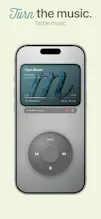
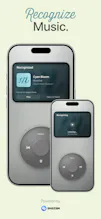
MuseDial reimagines the classic dial-based music player for the modern iPhone. Its glass dial, immersive Soul Screen, and focused full-screen interface make music feel tactile again, while supporting Apple Music, local audio, direct streams, and music recognition powered by Shazam. Unlike retro simulators or mini-app collections, MuseDial is built entirely around a polished, dedicated music experience.




Hi Product Hunt, I’m Tony, the developer of MuseDial.
MuseDial started from a simple idea: music players have become more capable, but often less focused. I wanted to build something that feels physical again — a full-screen music player centered around a glass dial, immersive album artwork, and a calmer listening experience.
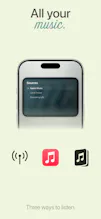
Listen your way
MuseDial supports:
Apple Music
Local audio
Direct audio streams
Feature highlights
Music recognition powered by Shazam
An immersive, expandable Soul Screen
Six distinct finishes
Audio format and metadata details
EQ for supported local audio
Local-first playback
MuseDial is a native iOS app built with Swift and is available as a one-time purchase with no subscription. The goal was not to create a retro simulator or a collection of mini apps. MuseDial is entirely focused on making listening feel more intentional and tactile.
Launch offer
MuseDial is currently available for $6.99, before returning to its regular price of $9.99 on August 24.
I’d love to hear what you think about the interaction, visual direction, and the idea of a dedicated tactile music player.
I’m based in Asia, so some replies may be delayed because of the time difference, but I’ll read and respond to every comment.
MuseDial reached the App Store a little earlier, but its Product Hunt launch was delayed because I caught the flu.
Thank you for checking out MuseDial.
The glass dial feels really satisfying to spin, way more tactile than I expected from an iPhone music app. Liked that it pulled in my Apple Music library without any extra setup.
@birsenablay77n Thank you! I’m really glad the dial felt as tactile as intended.
I also wanted Apple Music setup to stay as close to instant as possible, so it’s great to hear that the library loaded smoothly for you.