Hey Product Hunt ! I'm Dinesh, Founder of kyzenz.com
Why I wanted to build this application?
I wanted to build an expense tracker that is Private + Secure + Offline + Ad-Free and has Offline Expense Sharing + PDF Reports + optional Auto Google Backup. User data and privacy needs to be respected the most and that is the fundamental design of MoneyBoss Home. I believe I have build the closest possible application. As of now the ios version approval is pending. Please try the android version.
Why should one use MoneyBoss Home?
*The unique feature about this app is the Offline Family sharing feature. It can be used to consolidate the expenses of all the members of a family at month end. It needs no internet, no server, no account, no cloud, no bluetooth, no wifi. The sender generates a QR and the receiver uses the phone camera to scan it and receive the expenses. *The Dashboard has interactive pie chart and other sections provide all the important data. *The Add expense has everything you need in a single screen, no need to change screens. *The categories and tags are fully customizable. *The reports are robust and can filter or compare any type of data and can be exported as PDF. *There is an optional auto google backup feature that backs up every day automatically. *The local backup can be manually exported or shared. *Supports 5 languages.






Hey Product Hunt !
I'm Dinesh, Founder of kyzenz.com
Why I wanted to build this application?
I wanted to build an expense tracker that is Private + Secure + Offline + Ad-Free and has Offline Expense Sharing + PDF Reports + optional Auto Google Backup.
User data and privacy needs to be respected the most and that is the fundamental design of MoneyBoss Home. I believe I have build the closest possible application. As of now the ios version approval is pending. Please try the android version.
Why should one use MoneyBoss Home?
*The unique feature about this app is the Offline Family sharing feature. It can be used to consolidate the expenses of all the members of a family at month end. It needs no internet, no server, no account, no cloud, no bluetooth, no wifi. The sender generates a QR and the receiver uses the phone camera to scan it and receive the expenses.
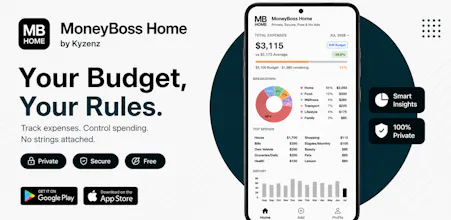
*The Dashboard has interactive pie chart and other sections provide all the important data.
*The Add expense has everything you need in a single screen, no need to change screens.
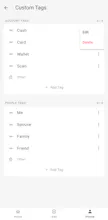
*The categories and tags are fully customizable.
*The reports are robust and can filter or compare any type of data and can be exported as PDF.
*There is an optional auto google backup feature that backs up every day automatically.
*The local backup can be manually exported or shared.
*Supports 5 languages.
Thank you ! for taking the time to review.