🚀 Meet Mocklify — realistic mock APIs for faster product development. Frontend work, QA testing, partner demos, and POC development should not stop just because production APIs are not ready yet. Mocklify helps teams create powerful mock API sandboxes from one clean workspace. With Mocklify, you can: 🔹 Create mock API endpoints 🔹 Manage environments 🔹 Simulate responses and edge cases 🔹 Trigger webhooks 🔹 Inspect request logs 🔹 Test integrations with confidence
No reviews yetBe the first to leave a review for Mocklify
Maker
📌
Mocklify was born out of a frustration I kept running into while building products: frontend development, QA, and third-party integrations were constantly blocked by backend availability. Even when mock APIs existed, they were often static, difficult to maintain, or scattered across different tools. The moment a workflow became stateful or required realistic behavior, the existing solutions started falling short.
I wanted a single workspace where developers could simulate real backend behavior instead of just returning static JSON. That meant creating mock APIs with dynamic responses, maintaining state through tables, replaying realistic workflows, inspecting requests, handling webhooks, and collaborating with teammates—all without waiting for a production backend. The goal wasn't simply to mock endpoints; it was to remove development bottlenecks so teams could build and test independently.
How did your approach evolve during the launch?
The initial vision was much smaller. I started with the idea of a straightforward mock API server, but while building and using it in real projects, I realized the real challenge wasn't generating responses—it was recreating the behavior of an actual backend.
That insight changed the direction of the product. Instead of focusing only on endpoint creation, I expanded Mocklify into a complete development workspace. Features like stateful tables, request logging, webhook support, environments, variables, response variants, and collaboration capabilities were added because they solved real problems encountered during development rather than following a predefined roadmap.
Throughout the process, I also learned that polishing the developer experience matters just as much as adding features. Small improvements in the interface, project organization, response editing, and workflow design often delivered more value than shipping another technical capability. Every iteration has been driven by the same question: "Would this genuinely help a developer ship faster?"
Mocklify is still evolving, but that philosophy hasn't changed. Every feature is evaluated by whether it removes friction from the software development process and helps teams move from idea to working product more quickly.
Report
How does Mocklify handle data persistence across sessions, like if I create a mock endpoint and close the browser, does my setup stick around? Also wondering if there is a free tier to play around with before committing.
Report
Maker
@sabriserme50640 Great question! Yep—your setup persists across sessions. Projects, endpoints, tables, environments, and configurations are all saved to your workspace, so you can close your browser and continue where you left off anytime.
We also have a free tier, and it includes the same core features as the paid plans. The main difference is the usage limits (such as the number of projects, endpoints, requests, and other resources). That means you can fully explore the platform and see if it fits your workflow before deciding to upgrade. We'd love to hear your feedback if you give it a try!
Report
How does this handle authentication flows like OAuth in the mocked endpoints, especially when I want to test the full flow without setting up a real auth provider?
Report
Maker
@aslhan316923 Absolutely. While Mocklify isn't an OAuth provider itself, you can mock the entire authentication flow by creating endpoints for token issuance, token refresh, user info, and protected APIs.
You can return custom access tokens, validate headers, simulate success or failure responses, different permission levels, expired tokens, and other edge cases—all without setting up a real identity provider. It's a great way to develop and test frontend authentication flows before the backend is ready.
Report
One thing I'd love to see is the ability to import a Postman collection or OpenAPI spec directly into Mocklify. That way teams can spin up mocks from existing API documentation in seconds instead of manually recreating every endpoint. Would save a ton of setup time for anyone onboarding new projects.
Report
Maker
@nihatpgyh Thanks for the suggestion! 😊 This is actually already supported in Mocklify.
You can import both Postman Collections and OpenAPI/Swagger specifications, and Mocklify will automatically generate the endpoints. The goal is to help teams get from existing API documentation to working mocks in just a few clicks, without having to recreate everything manually.
That said, we're always looking to improve the import experience. If there are additional parts of the workflow you'd like to see automated, I'd love to hear your ideas!
Report
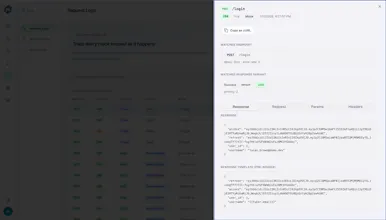
The request log inspector looks really thoughtfully done, exactly the kind of detail that saves you hours when debugging a flaky integration. Nice work making the workspace feel focused instead of cluttered.
Report
Maker
@vedatmdxs Thank you! Really glad to hear that. That was exactly the goal—to make debugging integrations faster while keeping the workspace clean and focused. Appreciate you taking the time to share your feedback! 🙌
Report
Mocklify made spinning up a sandbox for a side project super quick, and the request log inspector actually helped me catch a dumb payload mistake I would have shipped.
Report
Maker
@hamzasefil3idj Thank you! That's exactly the kind of experience we hoped to create. 😊 Making it quick to spin up a sandbox and giving developers the visibility to catch issues before they ship are two of Mocklify's core goals. Really appreciate you sharing your experience!
Report
The request log inspector caught me off guard, super handy when debugging webhook flows. Setup was quick and the environment switching feels right for QA work.
How does Mocklify handle data persistence across sessions, like if I create a mock endpoint and close the browser, does my setup stick around? Also wondering if there is a free tier to play around with before committing.
@sabriserme50640 Great question! Yep—your setup persists across sessions. Projects, endpoints, tables, environments, and configurations are all saved to your workspace, so you can close your browser and continue where you left off anytime.
We also have a free tier, and it includes the same core features as the paid plans. The main difference is the usage limits (such as the number of projects, endpoints, requests, and other resources). That means you can fully explore the platform and see if it fits your workflow before deciding to upgrade. We'd love to hear your feedback if you give it a try!
How does this handle authentication flows like OAuth in the mocked endpoints, especially when I want to test the full flow without setting up a real auth provider?
@aslhan316923 Absolutely. While Mocklify isn't an OAuth provider itself, you can mock the entire authentication flow by creating endpoints for token issuance, token refresh, user info, and protected APIs.
You can return custom access tokens, validate headers, simulate success or failure responses, different permission levels, expired tokens, and other edge cases—all without setting up a real identity provider. It's a great way to develop and test frontend authentication flows before the backend is ready.
One thing I'd love to see is the ability to import a Postman collection or OpenAPI spec directly into Mocklify. That way teams can spin up mocks from existing API documentation in seconds instead of manually recreating every endpoint. Would save a ton of setup time for anyone onboarding new projects.
@nihatpgyh Thanks for the suggestion! 😊 This is actually already supported in Mocklify.
You can import both Postman Collections and OpenAPI/Swagger specifications, and Mocklify will automatically generate the endpoints. The goal is to help teams get from existing API documentation to working mocks in just a few clicks, without having to recreate everything manually.
That said, we're always looking to improve the import experience. If there are additional parts of the workflow you'd like to see automated, I'd love to hear your ideas!
The request log inspector looks really thoughtfully done, exactly the kind of detail that saves you hours when debugging a flaky integration. Nice work making the workspace feel focused instead of cluttered.
@vedatmdxs Thank you! Really glad to hear that. That was exactly the goal—to make debugging integrations faster while keeping the workspace clean and focused. Appreciate you taking the time to share your feedback! 🙌
Mocklify made spinning up a sandbox for a side project super quick, and the request log inspector actually helped me catch a dumb payload mistake I would have shipped.
@hamzasefil3idj Thank you! That's exactly the kind of experience we hoped to create. 😊 Making it quick to spin up a sandbox and giving developers the visibility to catch issues before they ship are two of Mocklify's core goals. Really appreciate you sharing your experience!
The request log inspector caught me off guard, super handy when debugging webhook flows. Setup was quick and the environment switching feels right for QA work.