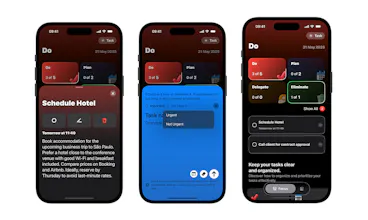
Stay focused and in control with MinTask — a simple, powerful task manager based on the Eisenhower Matrix. Prioritize what matters, manage tasks easily, set reminders, and stay on track with a clean, intuitive design. Customize with icons and keep your to-dos clear and actionable.
No reviews yetBe the first to leave a review for MinTask
Maker
📌
Hey Product Hunt 😃
Hello, I’m Rafael, the solo indie developer who built MinTask 👨🏾💻
MinTask was born after discovering a task organization method called the Eisenhower Matrix. It helps manage daily demands based on how urgent and important each task is to you.
Here’s an article that explains the Eisenhower Matrix in more detail
I started looking for an app that followed these principles — but (fortunately) couldn’t find one that fit my needs. That’s when I began planning and designing MinTask.
The name comes from MinimaTask, the idea that well-defined, minimal tasks result from good time management.
I have lots of ideas for this app — including ways to bring in AI. But first, I’m focused on validating the concept and learning how people use it 🚀
I truly hope MinTask helps you as much as it has helped me. I’m more than open to suggestions to keep making it better!
Report
Sounds sleek! But does it sync across devices? 🤔 And how’s the learning curve for new users?
Report
Maker
@tasha_petrovna Thanks! - Sync across devices is handled by Apple’s private iCloud. This means all data is securely stored and managed by Apple. MinTask doesn’t require any login — the system uses your Apple ID to authenticate and sync your data via iCloud.
- That’s a great point about the learning curve for new users. Right now, I display a carousel on the home screen — each card represents one of the four groups (Do, Plan, Delegate, Eliminate). When the user taps a card, it opens a detail screen with tips and an explanation about that specific group. Do you have any suggestions about it?
Thank you!!
Report
Finally, a task manager that's built around actual prioritization science! The Eisenhower Matrix is gold but so hard to stick to with regular apps
Report
Maker
@s_rawat Thank you so much! I really appreciate your feedback. Feel free to share any suggestions — I’d love to hear them! 🙂
Report
✅ "From urgent to done" – sounds like the ultimate productivity hack! The 16 early followers suggest strong interest from efficiency seekers. Perfect for those drowning in priority chaos. #TaskManagement
Report
The intuitive design makes managing my to-dos so much less stressful.
Report
Maker
@jerry_spinger Thank you Jerry!! Feel free to send any suggestions!! 🙂


Hey Product Hunt 😃
Hello, I’m Rafael, the solo indie developer who built MinTask 👨🏾💻
MinTask was born after discovering a task organization method called the Eisenhower Matrix. It helps manage daily demands based on how urgent and important each task is to you.
Here’s an article that explains the Eisenhower Matrix in more detail
https://www.prioritymanagement.com.au/how-to-use-eisenhower-matrix/
I started looking for an app that followed these principles — but (fortunately) couldn’t find one that fit my needs. That’s when I began planning and designing MinTask.
The name comes from MinimaTask, the idea that well-defined, minimal tasks result from good time management.
I have lots of ideas for this app — including ways to bring in AI. But first, I’m focused on validating the concept and learning how people use it 🚀
I truly hope MinTask helps you as much as it has helped me.
I’m more than open to suggestions to keep making it better!
Sounds sleek! But does it sync across devices? 🤔 And how’s the learning curve for new users?
@tasha_petrovna Thanks!
- Sync across devices is handled by Apple’s private iCloud. This means all data is securely stored and managed by Apple. MinTask doesn’t require any login — the system uses your Apple ID to authenticate and sync your data via iCloud.
- That’s a great point about the learning curve for new users. Right now, I display a carousel on the home screen — each card represents one of the four groups (Do, Plan, Delegate, Eliminate). When the user taps a card, it opens a detail screen with tips and an explanation about that specific group.
Do you have any suggestions about it?
Thank you!!
Finally, a task manager that's built around actual prioritization science! The Eisenhower Matrix is gold but so hard to stick to with regular apps
@s_rawat Thank you so much! I really appreciate your feedback. Feel free to share any suggestions — I’d love to hear them! 🙂
✅ "From urgent to done" – sounds like the ultimate productivity hack! The 16 early followers suggest strong interest from efficiency seekers. Perfect for those drowning in priority chaos. #TaskManagement
The intuitive design makes managing my to-dos so much less stressful.
@jerry_spinger Thank you Jerry!! Feel free to send any suggestions!! 🙂