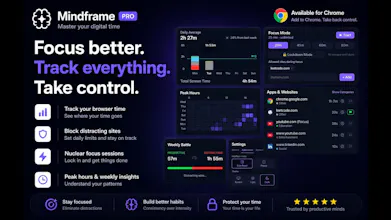
- Real-time screen time tracking per site & category - Beautiful hourly charts and weekly heatmaps - Site blocking with daily time limits - Focus sessions with Lockdown Mode (can't quit early) - Drift Detection — alerts you when you switch from productive to distracting sites - YouTube Focus tagging — mark study videos so they count as productive - Custom categories & site flagging - Weekly Battle Report: Productive vs. Distracting time
No reviews yetBe the first to leave a review for Mindframe
Maker
📌
Hey PH! 👋
I'm Niranjan — I built Mindframe because I kept opening Chrome "for 5 minutes" and losing an hour.
iPhone has Screen Time. Android has Digital Wellbeing. But the browser — where most of us actually spend our time —
had nothing good.
Mindframe fixes that. It's a Chrome extension that:
1. Tracks time per site automatically (zero setup)
2. Shows you where your hours actually went
3. Lets you block yourself from time-sink sites
4. Has a "Lockdown" focus mode you literally can't escape
A few things I'm proud of:
- Drift Detection — it notices when you leave GitHub and open Twitter within 5 minutes, and asks "was that
intentional?" One small nudge, no blocking.
- YouTube Focus tags — click a brain icon on any YouTube video to mark it as "studying." That video's time counts as
productive instead of entertainment.
- Everything is local — your browsing data never leaves your machine. Period.
It's $5 for lifetime access (no subscription, no upsells, no "premium tier 2"). The free tier gives you 7 days of
history and basic tracking.
Would love your feedback — what features would make this a daily driver for you?