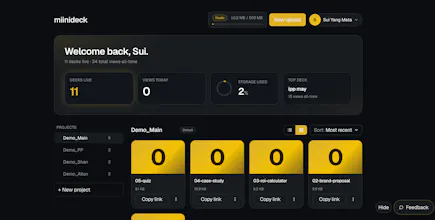
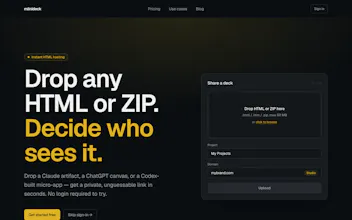
HTML hosting with the defaults set to private. Drop a self-contained HTML file or ZIP, get a private, unsearchable link in ~10s. Optional password and expiry, no login to view, JS runs. Works with anything — Claude, v0, ChatGPT, or hand-coded. Free to start.
Hey PH 👋 I run a small content/production studio, and the same friction kept
coming up: I'd put together a client deliverable — a proposal deck, an
interactive prototype, lately with AI in the mix — and then actually have to hand
it over. Emailing a file feels cheap, and it's out of date the second it lands.
A normal host puts it on the open web. The AI tool's share button makes it public
or makes my client log in.
What I wanted was simpler: a link I control. Private by default, a password if
it's sensitive, an expiry if it's time-boxed — and it works in the browser
without my client signing up for anything.
So miinideck is opinionated about one thing: privacy is the default, not a paid
add-on. Every link is unsearchable unless you choose otherwise. You decide who
sees it.
It's source-agnostic on purpose — any self-contained HTML or ZIP, whoever built
it. I didn't want it tied to one AI.
Would love your honest take, especially on the default-private call — what would
make this a no-brainer in your workflow?
Report
Maker
20-06-2026
Quick follow-up, because I've shipped a lot since I first posted this and I want to be honest about why.
miinideck started from something dumb: I kept emailing AI-built HTML artifacts as .html attachments and zip files, and half of them wouldn't even open on the other person's machine. So v1 was just — drop an HTML file, get a private link. That's it.
But the more I watched how people (me included) actually used it, the clearer it got that hosting was never the real job. The real job is the loop: you build something with AI → you show someone → they react → you fold that back into the next prompt. Hosting is only step one. Everything I've added these past few days is me chasing the rest.
So now it also does:
🔎 Review — anyone with the link can leave a comment pinned to the exact spot on your page. No account, no sign-up. They just click where it's wrong and type. Pinned, in-context feedback on any HTML page you share.
↩️ Export feedback back to your AI — one click turns the whole comment thread into a clean brief: which note points at which element, on which screen size. You paste it straight back into Claude / Codex and say "fix these." The part I'm proudest of — it closes the loop instead of leaving feedback stranded in some chat thread.
✏️ Edit text right in the page — fix a typo or a number without re-uploading the whole file.
🪪 Your name on it, not mine — share with your own creator credit on the page instead of a "Powered by" badge. If it's your work, it should look like yours.
⚡ Publish straight from your AI tool — there's an MCP/CLI, so the thing you just built can ship itself to a link without you ever leaving the tool.
Plus the quieter stuff: readable link labels, view analytics, dark mode, expiry + passwords, ZIP bundles.
None of this was on a roadmap. It's just me using my own tool, getting annoyed at the exact spot where the loop broke, and fixing that. If you try it and something feels off in that loop — that's the feedback I actually want.
Click the Review button on it and drop a comment anywhere — that's the whole feature, no account needed.
And honestly, if you'd rather not sign up but still want to tell me what you think of miinideck: just leave it right there on that page. Every pin lands with me, and I read all of them. 🙂
Report
Been using this for sharing work with clients and it’s honestly made reviews a lot smoother. What’s coming next?
Report
Maker
@shan_yee love that — client review is exactly the friction I built Review for 🙂
honest answer on what's next: I don't really keep a roadmap. I just build whatever trips me up in my own use that week (Review itself came from feedback getting stranded in chat threads). so the most useful thing — where does your client-review flow still feel rough? good odds that's what becomes next.
Report
can see Miinideck being useful when you just need to share a quick dashboard, prototype, or HTML output without setting up hosting or asking people to log in. The private-by-default approach is a good call, especially for client work. Not trying to do too much, which is probably the strength here. Any discount coupon code?
Report
No reviews yetBe the first to leave a review for miinideck
20-06-2026
Quick follow-up, because I've shipped a lot since I first posted this and I want to be honest about why.
miinideck started from something dumb: I kept emailing AI-built HTML artifacts as .html attachments and zip files, and half of them wouldn't even open on the other person's machine. So v1 was just — drop an HTML file, get a private link. That's it.
But the more I watched how people (me included) actually used it, the clearer it got that hosting was never the real job. The real job is the loop: you build something with AI → you show someone → they react → you fold that back into the next prompt. Hosting is only step one. Everything I've added these past few days is me chasing the rest.
So now it also does:
🔎 Review — anyone with the link can leave a comment pinned to the exact spot on your page. No account, no sign-up. They just click where it's wrong and type. Pinned, in-context feedback on any HTML page you share.
↩️ Export feedback back to your AI — one click turns the whole comment thread into a clean brief: which note points at which element, on which screen size. You paste it straight back into Claude / Codex and say "fix these." The part I'm proudest of — it closes the loop instead of leaving feedback stranded in some chat thread.
✏️ Edit text right in the page — fix a typo or a number without re-uploading the whole file.
🪪 Your name on it, not mine — share with your own creator credit on the page instead of a "Powered by" badge. If it's your work, it should look like yours.
⚡ Publish straight from your AI tool — there's an MCP/CLI, so the thing you just built can ship itself to a link without you ever leaving the tool.
Plus the quieter stuff: readable link labels, view analytics, dark mode, expiry + passwords, ZIP bundles.
None of this was on a roadmap. It's just me using my own tool, getting annoyed at the exact spot where the loop broke, and fixing that. If you try it and something feels off in that loop — that's the feedback I actually want.
Here's a live page with Review turned on → https://view.miinideck.com/OWVIGLHBOKyahAckAEtBm9PiWYZjwPBv
Click the Review button on it and drop a comment anywhere — that's the whole feature, no account needed.
And honestly, if you'd rather not sign up but still want to tell me what you think of miinideck: just leave it right there on that page. Every pin lands with me, and I read all of them. 🙂
Been using this for sharing work with clients and it’s honestly made reviews a lot smoother. What’s coming next?
@shan_yee love that — client review is exactly the friction I built Review for 🙂
honest answer on what's next: I don't really keep a roadmap. I just build whatever trips me up in my own use that week (Review itself came from feedback getting stranded in chat threads). so the most useful thing — where does your client-review flow still feel rough? good odds that's what becomes next.
can see Miinideck being useful when you just need to share a quick dashboard, prototype, or HTML output without setting up hosting or asking people to log in. The private-by-default approach is a good call, especially for client work. Not trying to do too much, which is probably the strength here. Any discount coupon code?