Launching today

Merkur
Browser terminal stack for your remote machines and AI
2 followers
Browser terminal stack for your remote machines and AI
2 followers
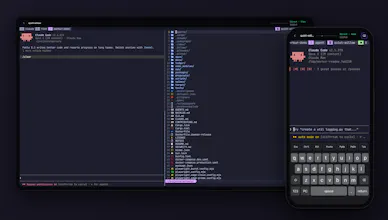
Merkur opens your Mac or Linux machines from any browser or phone as a real terminal, for Neovim, tmux, Claude Code or Codex. No SSH keys, VPN or open ports. It holds up on bad networks, renders like a native app and pings your phone when an agent needs you



Free
Launch Team / Built With


ArticosYour audience, ready to react to your messaging in minutes. Try free
Promoted
Hi Product Hunt! I'm Dmytro, and I've been building Merkur for the past ten months.
Merkur lets you open your own Mac or Linux machines from any browser or phone as a real terminal. You link a machine once with one command, and after that Neovim, tmux, Claude Code or Codex are a tab away: on your laptop, your phone, or a borrowed computer.
I built it because I wanted to reach my machines when I wasn't at my desk, and nothing I tried felt right. SSH apps wanted my keys or a VPN on every device, working from a phone on a weak connection was hopeless, and rendering glitches kept getting in the way of Neovim and Claude Code.
What you get:
• No SSH keys, VPN or open ports. Your machine connects out, and you sign in with a password.
• It holds up on bad networks, and your session survives a switch from Wi-Fi to cellular.
• It renders like a native terminal: sharp fonts and icons, inline images, clickable links.
• A phone keyboard with Esc, Ctrl, Tab and arrows, and it installs like an app.
• Push notifications when something needs you, like an agent waiting for input.
• Encrypted end to end, with each machine's key held in its Secure Enclave or TPM.
It's free and open source (AGPL). You'll need a recent browser: Chrome, Edge, Safari 26.4+ or Firefox on Windows or macOS.
I built this for myself and use it every day. I'd love to hear what you'd use it for and what breaks. I'll be here all day answering!