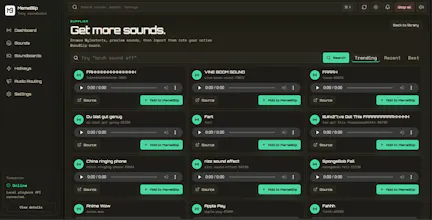
MemeBlip is a local-first Windows tray soundboard for games, calls, streams, and Discord. Search and import sounds, organize them into soundboards, assign hotkeys, preview clips locally, and route them through your mic path with VB-CABLE while keeping optional voice passthrough.
No reviews yetBe the first to leave a review for MemeBlip — Soundboard for Chaos
Maker
📌
I built MemeBlip because I kept running into moments in games, Discord calls, and random meetings where a perfectly timed sound effect would make everything funnier.
Most soundboards either felt too bloated, too stream-focused, or not local-first enough for the way I wanted to use one. MemeBlip is my attempt at a simple Windows tray soundboard that stays out of the way, runs locally, supports hotkeys, and can route sounds through your mic path using VB-CABLE.
The current version lets you search/import sounds, organize soundboards, preview clips, assign hotkeys, and use optional mic passthrough so your voice and sound effects can share the same route.
Would love feedback from gamers, streamers, Discord users, and anyone who has ever thought: “this exact moment needs a sound effect.”
Report
How does the local-first setup actually handle importing larger sound packs without slowing down the tray app?
Report
Maker
@cemlpsj it keeps your sounds locally and is never uploaded so there is no quality drop, the system tray is just there so that web companion can connect to your hotkeys and load your drivers
Report
Curious how the VB-CABLE routing actually plays with apps like Discord and games at the same time, any noticeable latency or conflict with the mic passthrough?
Report
Maker
@burakdpmh there is like half a second difference in the hotkey press, but if you play it directly with the web companion, it works with no lag but that is just preview only
Report
Quick question: does VB-CABLE routing work smoothly with Discord without extra setup, or will I need to fiddle with audio device permissions each time?
Report
Maker
@emredwp1 just download the setup, then vb cable with the link in the web dashboard set your devices once in audio routing and done, it works natively, and stays persistent
Report
How does the voice passthrough work in practice, do I need to set up VB-CABLE manually every time or does the app handle the routing on startup?
Report
Maker
@erifemzqk just set it up once, it adds it as a driver your mic and speaker quality is not deteriorated
Report
finally tried it last night on discord with friends and the VB-cable routing just worked without me touching any settings, which is rare. hotkey search is snappy too
Tried it during a Discord call and the local preview with hotkeys worked exactly how i wanted. Routing through VB-CABLE was painless, no extra setup headaches.
Report
Maker
@tunahankb0d Thanks a lot for the feedback, glad you liked it
How does the local-first setup actually handle importing larger sound packs without slowing down the tray app?
@cemlpsj it keeps your sounds locally and is never uploaded so there is no quality drop, the system tray is just there so that web companion can connect to your hotkeys and load your drivers
Curious how the VB-CABLE routing actually plays with apps like Discord and games at the same time, any noticeable latency or conflict with the mic passthrough?
@burakdpmh there is like half a second difference in the hotkey press, but if you play it directly with the web companion, it works with no lag but that is just preview only
Quick question: does VB-CABLE routing work smoothly with Discord without extra setup, or will I need to fiddle with audio device permissions each time?
@emredwp1 just download the setup, then vb cable with the link in the web dashboard set your devices once in audio routing and done, it works natively, and stays persistent
How does the voice passthrough work in practice, do I need to set up VB-CABLE manually every time or does the app handle the routing on startup?
@erifemzqk just set it up once, it adds it as a driver your mic and speaker quality is not deteriorated
finally tried it last night on discord with friends and the VB-cable routing just worked without me touching any settings, which is rare. hotkey search is snappy too
@ceylin1736493 thanks a lot for trying Memeblip. It would really help if you could star the github repo and upvote it - https://github.com/amaansyed27/m...
Tried it during a Discord call and the local preview with hotkeys worked exactly how i wanted. Routing through VB-CABLE was painless, no extra setup headaches.
@tunahankb0d Thanks a lot for the feedback, glad you liked it