
Megi
Turn linear AI chats into a structured knowledge tree.
10 followers
Turn linear AI chats into a structured knowledge tree.
10 followers
Megi is a browser extension that restructures your AI conversations into a clear sidebar tree. Drag and drop questions to organize logic, jump to context instantly, and manage long chats on ChatGPT, Gemini, DeepSeek, Qwen, Doubao, and more. Privacy-first & local storage.

Hello, I’m the maker of Megi.
As a heavy AI user (coding & writing), I kept running into a friction point: My mind branches out, but the chat interface remains linear.
When debugging or brainstorming, I often try Path A, realize it fails, and retreat to try Path B. In a standard chat interface, these distinct logical branches get flattened into a messy, linear scroll. Losing context becomes inevitable.
That's why I built Megi. It refactors your conversation into a Tree Structure.
The Philosophy: Logic Over Answers You'll notice Megi's sidebar only captures your questions, not the AI's answers. This is intentional.
I believe structuring the right questions is more important than hoarding answers.
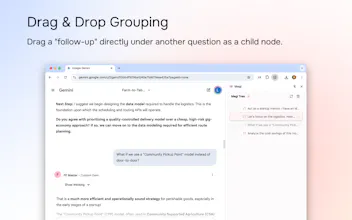
Drag to Think: When you drag a follow-up question under a main topic to create a sub-node, you aren't just organizing a UI. You are building a logic tree.
✨ Key Features:
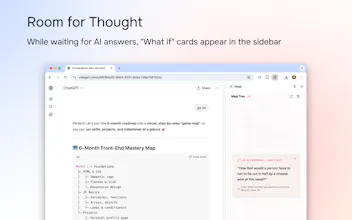
🌲 Auto-Tree: Automatically turns linear chats into a sidebar outline.
🖱️ Drag & Drop: Group related questions to keep your workspace clean.
⚡️ Instant Jump: Navigate long contexts without the scroll-wheel workout.
🙈 Auto-Fold: Automatically collapses long code blocks to reduce visual noise.
🔒 Privacy First: No servers. Your thought trees live 100% in your local browser.
🌍 Works on: ChatGPT, Gemini, DeepSeek, Qwen, Doubao, and more.