
Meeting Radar
What's on the radar that isn't on your calendar?
13 followers
What's on the radar that isn't on your calendar?
13 followers
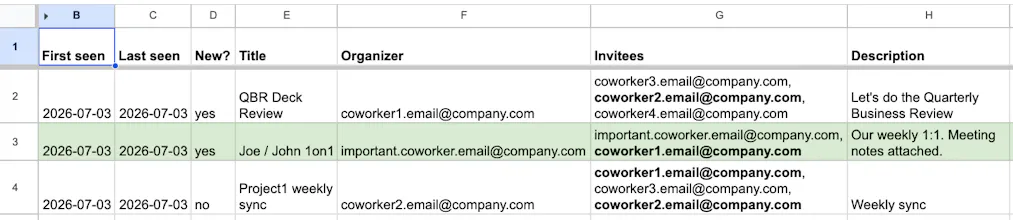
Meeting Radar turns the calendars your coworkers and leaders already share with you into one clean, always-current Google Sheet. It drops meetings you're already on, collapses recurring series into one row, and highlights the ones involving people you track. Strictly read-only: never writes, joins, RSVPs, or notifies anyone. Built for engineering, program, and project managers doing cross-team coordination on Google Workspace. Setup takes ~10 min, no coding. See the live demo before you buy.


Payment Required
Launch Team

SKYLARKA smarter way to book luxury hotels
Promoted
Maker here 👋 A big part of managing cross-team work is just knowing what's happening in meetings you're not in: another team's planning session, a partner org's syncs, a skip-level's calendar. Those calendars are usually shared with full details already; I just got tired of opening a dozen of them by hand every morning to catch what's new. This scans them for you and surfaces new events, minus anything you're already on. It's strictly read-only (same events you could already open by hand, it just saves the clicking). Demo with fake data is linked above. Happy to answer anything.
How does it handle situations where someone shares their calendar with you but toggles specific meeting details off for privacy? Does it still pick those up or skip them entirely?
@atakankudak Thanks for reaching out. Good question; it respects their privacy settings and skips those entirely. If someone's sharing is set to free/busy-only, or they've marked a specific event private, you won't see it at all: no partial info, no placeholder. It only ever surfaces meetings they've fully shared.
How does it handle calendars where someone has set very granular sharing permissions, like free/busy only versus full event details? Curious if the sheet ends up half-empty in those cases.
@ayazklkylvj Thanks for reaching out.
Not really; the sheet doesn't end up half-empty. It just reflects whatever each calendar owner actually shared, calendar by calendar. If someone's given you free/busy only, their events won't show up (since there's no title or detail to work with), but that doesn't affect anyone else's calendar. Full-detail calendars still show everything as normal.
Calm and useful little tool. The recurring series collapsing is exactly what my messy calendar needed, and the read-only promise made me comfortable sharing it with my team right away.
finally a tool that just reads my calendars without trying to be yet another meeting bot. setup was quick and seeing recurring series collapsed into one row is genuinely useful for cross-team tracking.
Squeezed my messy shared calendars into one readable sheet and the recurring meeting collapse actually saved me a real headache during sprint planning. Loved that it stays strictly read-only so nobody gets surprise invites.
The read-only angle is genuinely refreshing, no random invites going out because someone forgot a checkbox. Collapsing recurring series into one row already saved me from staring at the same standup five times on Monday.