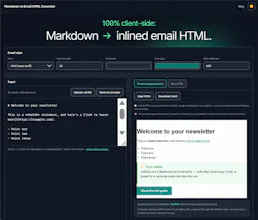
Write your marketing emails without coding and send them to your liking. - Write in Markdown. - Auto-saved locally on your browser. - Get the HTML. It's that simple, and it just works.
No reviews yetBe the first to leave a review for Markdown to Email
Maker
📌
Hey Product Hunt 👋
I built Markdown to Email because I kept writing content in Markdown and then losing around 20 minutes every time fixing broken formatting after pasting it into an ESP. Outlook strips blocks, so colors, spacing, and fonts fall apart unless every rule is inlined by hand. I did search for similar tools but either they were paywalled or didn't do what I wanted them to do. So I decided to build the tool.
A few things I focused on:
Everything runs client-side, so your content never touches a server
No signup, no account, ever
Two extensions built specifically for newsletters: Markdown-syntax callout boxes and a CTA button shorthand, so you're not hand-coding either
It's free and stays free. No part of the core conversion is ever gated.
Would love your feedback, especially if you hit any Markdown syntax that doesn't convert the way you'd expect, or an ESP where the pasted HTML doesn't behave. I'm here and will respond as soon as possible.
Report
Love how simple this is, the local auto-save alone is a huge win. One thing that would make it even better is letting users save multiple drafts with custom names so you can keep different email versions side by side instead of overwriting one in-progress doc.
Report
Maker
@ayegl433435 Thank you so much. Ayşegül, multiple drafts is a smart idea, and it's a good fit for the tool since it doesn't require an account or backend. It is just more structured local storage. Adding it to the list of what's next. Appreciate you taking the time to suggest it!
Report
The Markdown auto-save is a lifesaver, but it would be great if you could add a few preset email templates or a starter stylesheet so the HTML output looks polished right away instead of needing extra CSS work on my end.
Report
Maker
@cumavarl10215 Appreciate that. That's a totally fair point. The output was kept intentionally minimal so it doesn't fight with whatever styling someone already has, but you're right that a lot of people would rather start from something polished and strip it down than build up from plain. A few starter stylesheets or template presets is a good direction. I am noting it down as a real option to explore. Thanks for the specific suggestion!
Report
love how the local autosave just quietly does its thing in the background, no signups or cloud sync to fiddle with. the markdown-to-html pipeline feels snappy too.
Report
Maker
@selinbcci Thanks Selin. The no-signup feature was non-negotiable for me going in. Glad you found it convenient. And also good to know the pipeline feels fast on your end , the result of client-side processing and no server round-trip.. Appreciate you noticing both!
Report
Love that it auto-saves locally in the browser. That kind of frictionless detail shows the team really thought about the writing flow rather than just the output.
Report
Finally a no-fuss way to draft emails in markdown without dealing with clunky builders. The local autosave is a nice touch, lost too many drafts in other tools before.
Report
Maker
@akozluca7852 Really appreciate that. The local autosave came directly from hating that exact thing myself. Glad it's landing for you too. Let me know if you run into anything as you keep using it!
Report
Love that everything saves locally without forcing a sign-up, such a refreshing change from tools that gate basic functionality behind accounts.
Report
Maker
@keremmxlu Really appreciate that you love it. Thank you for your kind words.
Love how simple this is, the local auto-save alone is a huge win. One thing that would make it even better is letting users save multiple drafts with custom names so you can keep different email versions side by side instead of overwriting one in-progress doc.
@ayegl433435 Thank you so much. Ayşegül, multiple drafts is a smart idea, and it's a good fit for the tool since it doesn't require an account or backend. It is just more structured local storage. Adding it to the list of what's next. Appreciate you taking the time to suggest it!
The Markdown auto-save is a lifesaver, but it would be great if you could add a few preset email templates or a starter stylesheet so the HTML output looks polished right away instead of needing extra CSS work on my end.
@cumavarl10215 Appreciate that. That's a totally fair point. The output was kept intentionally minimal so it doesn't fight with whatever styling someone already has, but you're right that a lot of people would rather start from something polished and strip it down than build up from plain. A few starter stylesheets or template presets is a good direction. I am noting it down as a real option to explore. Thanks for the specific suggestion!
love how the local autosave just quietly does its thing in the background, no signups or cloud sync to fiddle with. the markdown-to-html pipeline feels snappy too.
@selinbcci Thanks Selin. The no-signup feature was non-negotiable for me going in. Glad you found it convenient. And also good to know the pipeline feels fast on your end , the result of client-side processing and no server round-trip.. Appreciate you noticing both!
Love that it auto-saves locally in the browser. That kind of frictionless detail shows the team really thought about the writing flow rather than just the output.
Finally a no-fuss way to draft emails in markdown without dealing with clunky builders. The local autosave is a nice touch, lost too many drafts in other tools before.
@akozluca7852 Really appreciate that. The local autosave came directly from hating that exact thing myself. Glad it's landing for you too. Let me know if you run into anything as you keep using it!
Love that everything saves locally without forcing a sign-up, such a refreshing change from tools that gate basic functionality behind accounts.
@keremmxlu Really appreciate that you love it. Thank you for your kind words.