Mailpass consolidates credential storage, access management, and email security into one turbocharged platform. We simplify security, keeping your team safe without slowing them down.
No reviews yetBe the first to leave a review for Mailpass
Maker
📌
Hi Product Hunt 🚀!
I’m George, part of the founding team at Mailpass.
Together with my teammates Gregor and Clifford, we built Mailpass because we were frustrated with the options available for teams looking for a simple, no-nonsense solution to help us securely manage our growing number of SaaS applications and user credentials as our teams scaled up in previous roles.
Password managers like 1Password and Bitwarden prioritize the individual user experience and their features for organizations are ‘one-size-fits-all’ without catering for the nuances involved with each team’s approach to managing their SaaS credentials. These solutions also lag behind in the rise of passwordless authentication with master passwords still acting as the back stop to access any stored credentials. In contrast, registering for Mailpass is exclusively through Passkeys and every employee authorizes their device upon signing up for the platform.
Beyond credentials, as leading SaaS apps continue to roll out authentication through one-time codes and magic links, company inboxes suddenly act as de facto authorization hubs. With the line between credentials and email-based authentication blurring, we built Mailpass for teams that want to stay ahead of the curve and experience access management ready for a passwordless future.
Our team comes from security backgrounds, having previously worked operations and security roles within distributed companies where a solution like Mailpass would’ve saved us days, if not weeks of time managing security, email, and account access. Not to mention the cash we could’ve saved on our SaaS subscriptions by not signing up for expensive SSO (Single-Sign On) plans that charge a premium for more secure authentication.
Mailpass is built from the ground up for team use only. We don’t have individual plans and our full focus is on creating the best experience for admins and employees alike with no IT or security experience required.
What do you get with Mailpass?
🔒 Depend on government-grade encryption to store account passwords and ToTPs across browsers and devices with our zero-knowledge and zero-trust cloud-only platform.
💬 Don't get bogged down by access requests. Mailpass centralizes employee access requests and account provisioning, all in one place.
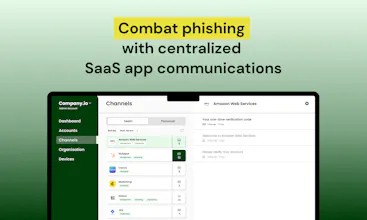
✉ Eliminate phishing from your SaaS apps. Mailpass protects your company inboxes from threat actors trying to act as your platforms.
🤝 Teams using Mailpass adhere to a range of compliance requirements included in ISO, SOC2, and more. Breeze through certification controls and procurement questionnaires from prospective clients.
Hit us with all of your questions and feedback in the discussion, we'd love to know what you think!
Want to try Mailpass out for free? Book a zero-commitment demo call with me here to learn more.
Team Mailpass
Congratulations George, Gregor, and Clifford! Super exciting to see passkeys at the forefront of an access management platform :)
I'm curious to hear - you mentioend that 1Password and Bitwarden don't cater to how teams manage SaaS credentials. What sets Mailpass apart from these tools?
Report
Maker
@danielzhang
thanks for the good question -
a couple of the ways we make this easier for teams:
- Our permissions model is how teams actually operate, and do not require an Admin to craft folders and various granular permissions. We noted how this (for the majority) leads to confusion and often counterintuitively the wrong permissions being set. Admins are very clear who has access to what with Mailpass.
- With Email now effectively a part of credentials for more and more services (ie passwordless) we bring this into the same platform removing the need to ask or share inboxes or copy paste codes or links from emails. We also streamline things like presenting your email OTPs right there in the browser, like many are used to on their phones with SMS otp.
- Onboarding / offboarding - I was even confused when I had to onboard a team via Bitwarden in a past role. Did they now actually actually have access? Was their master password good enough? Did they have it on every device? With Mailpass it takes a user about 10 seconds to add their first device and get the access they need, with MFA by default being activated through Passkeys.
And offboarding via Mailpass is a single click to remove all devices a user has added. It is strangely easy for an offboarded employee to retain access to a local vault like 1Password or Bitwarden for some amount of time after the admin thinks they have disconnected.
We have super easy import from 1Password / Bitwarden, and flexible pricing for team usage unlike the others.
We think you will be converted after trying (of course)!
Congrats Greg, George, and Clifford on the successful launch. Your innovative use of passkeys with Mailpass marks a significant step towards a passwordless future. I’m excited to see the upcoming iterations build on this solid product.
With remote work and contract employees, it's increasingly difficult for a company to keep up with SaaS credentials. Great solution to achieve SaaS credential hygiene.
Playbook
Huddle