
Macmobility
Control your MacOS apps with iPhone and iPad
6 followers
Control your MacOS apps with iPhone and iPad
6 followers
Powerful remote control app for MacOS which is working together with companion apps for iPhone and iPad that lets you launch apps on your Mac with a single tap. Automating workflows, opening essential tools, MacMobility makes it effortless and intuitive.




Hey PH!
I'm Mariusz, solo MacOS and iOS developer. MacMobility is native, 100% Swift / SwiftUI MacOS application that allows to control other Mac apps. It works together with companion app for iPhone / iPad - MobilityControl.
With just a tap on your iPhone or iPad, you can:
Launch apps on your Mac
Trigger Apple Shortcuts (including curated, ready-made ones)
Run custom Bash scripts
Create and execute keyboard macros
Convert files effortlessly
Build and run powerful automations
It also have:
Virtual Desktop Streaming
Create a virtual Mac desktop and stream it directly to your iPhone or iPad - like Sidecar, but without iCloud restrictions. It supports iPhones and includes touch controls for smooth interaction.
Store and launch web URLs
MacMobility includes built-in browser automations that detect open URLs and save them for later use. You can customize each saved website with your own icons and names, or rely on the automatic metadata fetching mechanism to generate them for you.
App-Specific Pages
Assign pages to individual apps. Create utility dashboards tailored for specific software, and MacMobility will automatically switch to the relevant page when you focus that app - boosting your workflow with fewer manual steps.
Quick Action Menu
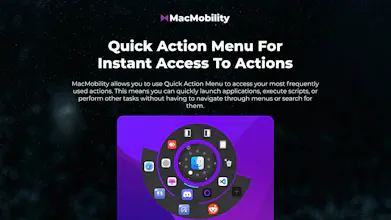
No companion device connected? No problem. Assign favorite actions to the new Quick Action Menu. Just press Control + Option + Space, and the action wheel appears under your cursor - letting you trigger MacMobility features instantly.
HTML/JS Widget Support
MacMobility now supports rendering custom HTML/JS widgets! Use your own web code to build tools that assist your workflow. We’ve included four example widgets to get you started - but the sky’s the limit.
It can be best summarized by one of my users - "Many people will compare this app to Elgato’s Stream Deck, but the benefit to MacMobility is that the device lives on my iPhone so it’s always with me. And what I really appreciate, combined, the iOS MobilityControl and the macOS MacMobility app both come in under 100MB!"