
Lynx OS
Autonomous AI that plans, executes, and completed work.
10 followers
Autonomous AI that plans, executes, and completed work.
10 followers
Lynx is an autonomous AI agent with its own operating system that plans, executes, and completes real work across your business. Give Lynx a goal—research competitors, analyze spreadsheets, create proposals, update your CRM, browse websites, generate reports, or automate repetitive workflows—and it figures out the steps, uses your connected tools, and delivers the final result. No prompt engineering. No fragile automations. Just work getting done
Interactive






Free Options
Launch Team / Built With


Hey Product Hunt 👋
I’m Levy, founder of Apex7AI and maker of Lynx OS.
Every company already has plenty of software.
Email.
CRMs.
Documents.
Spreadsheets.
Calendars.
Project management tools.
Dashboards.
Internal systems.
But the work still gets stuck between them.
An email arrives and waits for someone to update the CRM.
A task is completed and waits for someone to update the dashboard, organize
the files, notify the team, and create what happens next.
A sales opportunity goes inactive and waits for someone to notice.
A spreadsheet changes and waits for someone to turn the numbers into a report.
The problem is not a lack of software.
The problem is that every application still waits for a person to move the
work forward.
We kept asking ourselves:
What if an AI system could understand the outcome, create the plan, use the
right tools, and complete the operation?
That question became Lynx OS.
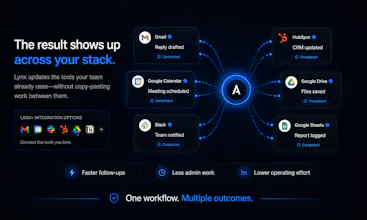
Lynx is an autonomous AI operating system for real work across your connected
tools.
Instead of building every automation one block at a time, you describe the
outcome you want.
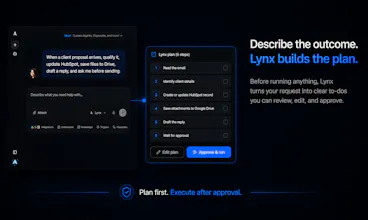
Lynx creates a visible TO-DO plan, lets you review it, selects the required
tools, executes the work, and delivers the finished result.
Here are some examples of what you can do with Lynx:
📥 Turn incoming requests into completed operations
Say:
“Process the newest proposal email.”
Lynx can:
• Find and read the matching Gmail message
• Extract the contact, company, requirements, budget, and timeline
• Search or update HubSpot
• Create the opportunity
• Save attachments to Google Drive
• Prepare the response
• Create a follow-up task
• Stop for approval before sending
🔄 Keep work moving after a task is completed
When a project task is marked complete, Lynx can:
• Read the task, comments, and related files
• Update the project dashboard
• Create the next tasks
• Organize the documentation in Drive
• Notify the team in Slack
• Email the completion summary
• Schedule the follow-up
The work does not stop because someone clicked “Done.”
📈 Recover opportunities hidden inside your CRM
On a schedule, Lynx can:
• Review your active pipeline
• Find deals without recent activity
• Read previous emails and CRM notes
• Identify the best next action
• Prepare personalized follow-ups
• Create tasks for the sales team
• Update the dashboard
• Email the manager brief
📊 Turn operational data into executive decisions
Ask:
“Prepare tomorrow’s executive review.”
Lynx can:
• Read the latest spreadsheets
• Validate missing or inconsistent data
• Calculate KPIs
• Identify changes and risks
• Create charts
• Generate the executive PDF
• Build the Google Slides presentation
• Deliver the meeting package
The value is not generating one chart.
The value is that the meeting package arrives finished.
🎥 Turn research into a repeatable content operation
Lynx can:
• Review new videos from selected channels
• Extract topics, arguments, and audience reactions
• Identify emerging trends and content gaps
• Create content ideas and briefs
• Update the editorial calendar
• Build the weekly presentation
• Email the report
• Repeat the process on a schedule
🗓️ Start every morning with the work already organized
A scheduled morning workflow can:
• Review your calendar
• Find priority emails
• Check overdue tasks
• Identify stalled opportunities
• Surface project risks
• Generate the daily dashboard
• Deliver your morning brief
Lynx is not limited to one-off tasks.
Once a process works, it can be saved as a reusable workflow and executed
again through a simple message or on a schedule.
You stay in control.
You can review every plan, edit the TO-DOs, approve sensitive actions, or let
safe internal steps run automatically.
Lynx operates as one autonomous agent by default. For specialized roles, you
can also create dedicated agents with their own instructions, knowledge,
tools, and workflows.
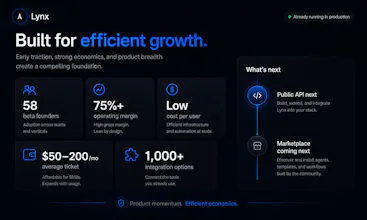
So far, 58 Founding Beta users have joined us organically, and their feedback
is directly shaping the product.
Our goal is not to build another chatbot.
Our goal is to build the operating system that keeps work moving after the
first instruction.
I’ll be here throughout the launch reading every comment and answering every
question personally.
What is the first real workflow you would give to Lynx?
🎥 Watch the demo: YOUTUBE LINK
👉 Try Lynx OS: https://lynx.apex7ai.com
Thank you for checking out Lynx OS ❤️
Levy M
Founder, Apex7AI
Autonomous AI that plans, executes, and delivers is an ambitious direction. I'm curious—where have you found users are most comfortable handing work over completely, and where do they still want to stay involved in the loop?
@aryan787544 Great question on security! Here's how it works under the hood:
Isolated environments: Each user gets their own workspace. If a session is inactive, it automatically shuts down — no cross-user data leakage.
Authorization, not passwords: We never see or store your credentials. Gmail, Slack, HubSpot — all connections use OAuth flows powered by and Google Auth. You click "Connect," authorize on the provider's page, and Lynx gets a scoped token with only the permissions you approved.
You control the tools: You decide exactly what Lynx can and can't do. Want it to read emails but not send? Done. Want it to access Slack but only specific channels? Set it up. And if you want it to ask you before every action, that's a toggle away.
Privacy: Your prompts and workflows stay yours.
We also noticed that users become much more comfortable after they have watched Lynx complete the same workflow successfully a few times.
That is why Lynx shows the execution plan and TO-DOs, allows users to limit the available tools, and can stop for approval before sensitive steps.
We are not trying to force users to choose between doing everything manually and giving an AI complete control.
The idea is earned autonomy.
Start supervised, understand how Lynx works, and gradually automate the steps
Because it has its own operating system, it can handle multiple tasks simultaneously—requiring only a few clicks and prompts to make adjustments.
This sets it apart; users save significant time on grueling tasks that used to take hours but are now completed in minutes.
There is also a noticeable reduction in monthly costs compared to standard alternatives.
Our $20 plan offers a comprehensive package: user access, automation, workflows, no-code agent creation, and a variety of models—so users aren't locked into just one LLM—all within a single plan. That is why people choose us.
Happy to go deeper on any of this!
@apex7ai Really enjoyed this conversation. The idea of "earned autonomy" is a much more interesting framing than simply automating tasks.
I've got a few thoughts on where I think that positioning could become an even stronger advantage as the category evolves. If you're open to it, what's the best email to send them to?
@aryan787544 I’d really appreciate that — thank you.
You can reach me directly at contato@apex7ai.com.
Please feel free to send your thoughts openly, especially around positioning,
earned autonomy, trust, or where you think Lynx could stand out as this
category evolves.
I’m still very close to the product and I personally read every piece of
feedback from early users and builders.
Looking forward to hearing your perspective.
@apex7ai Thanks! I’ve just sent it over.
Looking forward to hearing your thoughts whenever you have a chance.