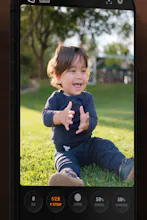
Hey Product Hunt! I’m excited to finally share Lustra. I’m a product designer by trade, but photography has always been one of my favorite hobbies. Over the years I’ve tried just about every professional camera app on the App Store, and while they all had great features, I always found myself fighting the interface. So I started building the camera app I wanted to use. The idea behind Lustra is simple: Professional camera controls should be at your fingertips, not hidden behind layers of menus.
👋 Hey Product Hunt!
I’m excited to finally share Lustra.
I’m a product designer by trade, but photography has always been one of my favorite hobbies. Over the years I’ve tried just about every professional camera app on the App Store, and while they all had great features, I always found myself fighting the interface.
The controls I used most were buried in menus, or there were so many buttons on screen that taking a photo started to feel more like operating software than using a camera.
So I started building the camera app I wanted to use.
The idea behind Lustra is simple:
Professional camera controls should be at your fingertips—not hidden behind layers of menus.
Everything in the app is designed around helping you adjust your settings quickly, stay in the moment, and spend more time composing your shot instead of hunting for controls.
Some of the things you’ll find in Lustra:
* 📷 Manual focus, ISO, shutter speed, white balance, and exposure
* 📸 RAW photo capture
* ✨ A custom portrait mode with natural-looking bokeh
* 🎞️ An interface inspired by the simplicity of analog cameras
This is still just the beginning. I have a long list of ideas I can’t wait to build, and I’d genuinely love your feedback.
If you give Lustra a try, let me know:
* What’s your favorite part?
* What feels awkward?
* What’s one feature you’d love to see?
Thanks so much for checking it out—I hope Lustra becomes a camera you actually enjoy shooting with. ❤️
Tailor