Lunar

Lunar

Intelligent adaptive brightness for your external display

5.0
1 review

30 followers

The built-in display brightness of your Macbook or iMac is synchronized to the external monitor. Custom brightness and contrast values are computed for each external monitor by passing the built-in brightness through a curve algorithm that is completely configurable by the user.
This is the 7th launch from Lunar. View more

Lunar 5

Control every aspect of your external monitors
If you got a new monitor for your Mac, you noticed there's no way to control its brightness from the Mac.

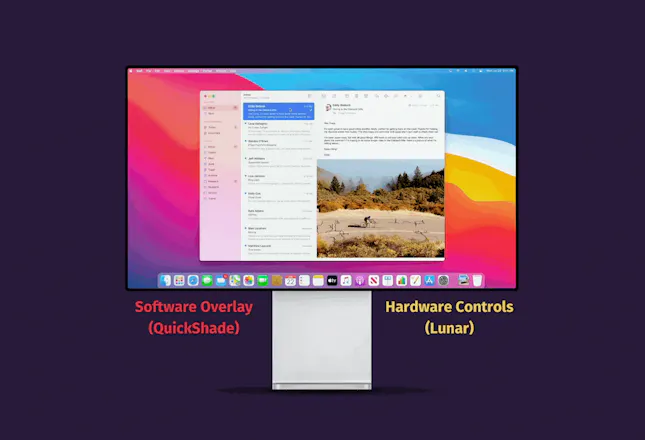
Lunar brings back brightness control for monitors, along with volume, contrast, input switching and can even turn off monitors or the built-in display.
Lunar 5 gallery image
Free Options
Launch tags:MacOpen SourceGitHub
Launch Team
Vy - Cross platform AI agent
AI agent that uses your computer, cross platform, no APIs
Promoted

What do you think? …

Alin Panaitiu
Hi everyone! I'm Alin, the creator of 🌕 Lunar, an app for controlling every aspect of your 🖥 external monitors. 1 year ago I quit my well paid job and began investing my time into making a living off Lunar. I'm now making half of the salary from that 💸 "well-paid job" solely from Lunar sales. That has allowed me to work on Lunar full time, while also creating other Mac apps on https://lowtechguys.com/ I'm giving 75% OFF ‼️ the Pro license to 20 ProductHunt users. Use the following coupon code at checkout: PH75OFFLUNAR5 --------- I've been posting about major versions of Lunar on ProductHunt since v1, but this one is special. I finally feel that Lunar has reached a very stable base, compatible with all monitors in existence* and able to control things that you didn't even know was possible. Adaptive Brightness for external monitors is Lunar's greatest feat, but there are a few new features you might find useful: • ⏻ BlackOut:   - 💻️ Turn off MacBook display without closing the lid (automatically when a monitor is connected)   - 🖥️ Turn off external monitors while still keeping their charging/USB functions so you can focus on one screen at a time • 🎬️ App Presets: set brightness to a specific value based on what app is visible • ⏱️ Schedule brightness to change on specific time of day • 🔆 Brightness Dimming for Sidecar, AirPlay, TVs and DisplayLink screens • 🎨 Color Calibration controls (if the monitor supports them) • 🔌 Switch to other HDMI, DisplayPort or Thunderbolt ports using keyboard shortcuts (you can forget about KVM devices) • $Command-line scripting: https://lunar.fyi/#cli • 🏮Use any Ambient Light Sensor for adapting brightness: https://lunar.fyi/#sensor * some monitors might appear incompatible because they are non-compliant with the DDC standard or because of Mac hardware limitations, this is not a problem with Lunar and can't be fixed in software
Flavius
@alin23 thank you! Just bought and excited to try!
Harshit Choudhary
Hey, I am using Windows right now but I'm considering to buy new Mac Mini (Studio?) so, will Lunar be helpful? Edit: I do have an LG Monitor but its not a UHD one.
Alin Panaitiu
@choudhary Lunar is especially useful on Mac Mini since your only choice for a screen there is an external monitor which doesn't support brightness control from the Mac. The only (modern) monitors that support native Mac brightness control are the LG Ultrafine 5K and the Pro Display XDR which are prohibitively expensive. For everything else, there's Lunar :) If you also get a monitor with speakers or jack output, you can use Lunar to also control its volume. And if you want to keep using your Windows PC with the same monitor, you can use Lunar to switch inputs with a keyboard shortcut. If you want automatic brightness for the Mac Mini, there's also the possibility of using a wireless ambient light sensor: https://lunar.fyi/sensor (although you have to do it yourself ^_^)
Harshit Choudhary
@alin23 sounds amazing! (hope the promo doesn't run out until I get my hands on the new Mac Mini/Studio :P)
Alin Panaitiu
@choudhary If you get the Mac Mini after the coupon expires, let me know and I'll make an exception ^_^
Harshit Choudhary
@alin23 that's so nice of you, thank you! :)
Kim Salmi
Very nice "side hustle"! Congrats on the launch 🎉
Alin Panaitiu
@infr Thank you Kim! ✨
Derek Nuzum
This is really cool! As someone that is intimately familiar with the nuances and difficulties managing displays and preferences, this is quite simply inventive and contains loads of functionality missing from any OS. Thanks for the linking to Plugable (disclaimer: I work for them)! The DisplayLink stuff is tricky and beyond neat!
Alin Panaitiu
@dnuzum Oh wow, nice to meet you! I always recommend Plugable to Lunar users that only have DisplayLink as an alternative. I like its simplicity :)
Basharath
Looks great. Congrats on the launch!
Alin Panaitiu
@basharath Thank you Basharath! Good luck with Tweetlet! I love these small utilities for generating pretty content (like carbon.now.sh for code, or Apollo for Reddit)
Basharath
@alin23 Thanks for noticing Tweetlet. I'm adding few other features to make it a very useful tool for generating social media content.
charith_a
Wow, looks great. Congrats!
Alin Panaitiu
@charith_a Thanks! As a fellow plumber of bits and bytes, I'm looking forward to see what you'll build 😊
DP
It was NEEDED! Thanks
12
Next
Last