
Longtake
Free AI video studio — you pay the model, not a markup
4 followers
Free AI video studio — you pay the model, not a markup
4 followers
Shooting is free — renders are billed by BytePlus straight to your own API key at list price. No credits, no markup, nothing expiring unused. Inside: projects, scenes and takes instead of a chat log; a voice sample pinned to a character so they sound the same in every scene; drag a box on a finished take to fix one detail; upscale, 60fps, an MCP server. €9.99/mo covers the disk and bandwidth your takes live on — without it a project stays open for a day.




Hey Product Hunt 👋
I've spent the last two months learning to shoot with AI video models — about 640 takes, most of them just working out how prompts behave. Somewhere in there I stopped and looked at where the money was going, and most of it wasn't the model.
The models these tools all run on — Seedance 2.0 and 2.5 — are BytePlus. Higgsfield, Runway and the rest wrap them in credits, and a credit is just a markup with a nicer name: the unit price disappears, and whatever you don't spend this month stays with them. On an entry-tier credit plan the same take runs about three times the provider's own rate.
So Longtake resells nothing. You plug in your own BytePlus key, the tokens are billed to you directly, and the studio is free to use. The €9.99/mo isn't access — it's the disk your takes sit on and the bandwidth they leave through, plus the time I put into the studio. Without it a project stays open for a day and is swept a week later; with it, your projects stay.
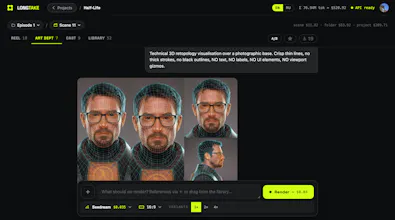
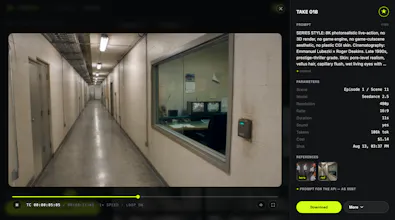
The studio is the part that took the work. Projects hold episodes, episodes hold scenes, scenes hold takes, so a series stops living in a chat log. A character carries a locked voice sample that goes into every generation they speak in, which turned out to be the only reliable way to keep a voice from drifting between scenes. Type @ and a character's name and their portrait and voice are attached as references, and the prompt that actually went to the API stays visible on the finished take.
Two more things that took real work. "Fix a detail": pause a finished take, drag a box around what's wrong, say what it should be instead. And upscale with 60fps interpolation, so you can iterate at draft resolution and finish at 1080p for a fraction of what rendering there natively costs. There's an MCP server too, so Claude can shoot takes in the studio it helped write.
Anyone arriving from this page gets the first month at half price — it's applied automatically when you subscribe, no code to type.
Happy to get into the token math or the API quirks.