LiveSyncDesk

LiveSyncDesk

Real time collaboration with a portable synced board.

50 followers

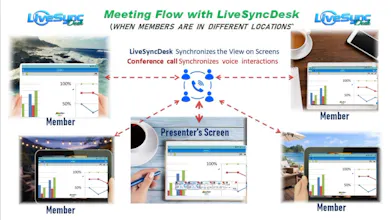
LiveSyncDesk is your private shared space for friendly discussion, teaching, and explaining with images or synchronized board drawing in real time. Start a board, invite anyone with a link, and stay perfectly in sync while you sketch ideas, upload images, and use Synchronized Zoom to focus on the exact details together. Whether it’s online teaching, quick team discussions, or remote reviews, LiveSyncDesk is a personal project by an independent developer under active development.
LiveSyncDesk  gallery image
Free
Launch Team
Tines
Tines
The intelligent workflow platform
Promoted

What do you think? …

LiveSyncDesk
Hey Product Hunt 👋 I built LiveSyncDesk because I kept facing some problems like: Whenever I had to explain something using an image (teaching / guiding / discussing), I had to save it, edit/mark it, and send it back again and again — it was slow and messy. So I wanted a simpler way: a private shared space where both people stay on the same screen. With LiveSyncDesk you can ✅ Start a shared board & invite anyone with a link ✅ Upload an image and annotate together in real time ✅ Use ZoomSync so both users focus on the exact same detail at same time. Its like looking both at the same frame on zooming. ✅ Perfect for private online teaching, quick discussions, and remote reviews It’s a personal project by an independent developer and it’s under active development. Would love your feedback + feature ideas 🙌
LiveSyncDesk

No download , No login / register. Just copy invite link and send it to anyone.

wisdom ojieh [copywizard]
As a copywriter, I spend a lot of time explaining ideas visually to clients, and the screenshot back and forth really does break flow. This feels like a simple fix to a very annoying problem. Nice work on keeping it focused.
LiveSyncDesk

@copywizard Hey Ojieh — sorry for the delayed reply 🙏

Really appreciate this! 🙌 Love hearing that it helps reduce the screenshot back-and-forth and keeps the flow smooth. That’s exactly the problem I’m trying to solve.

If you ever have a feature request for client discussions (quick pointer / highlight / notes etc.), I’m all ears. Thanks again!

wisdom ojieh [copywizard]
@livesyncdesk Appreciate that. One thing that would be huge for client work is being able to attach short context to a pointer, like “why this matters” or “what decision we need here”, so feedback stays decision focused, not just visual. I work as a copywriter and spend a lot of time helping products communicate value clearly, feel free to reach out if you ever want feedback from that angle.
LiveSyncDesk

@copywizard This is a really good idea 🙌

Attaching a short context label to a pointer/comment (ex: ‘why this matters’ / ‘decision needed here’) would keep feedback focused and reduce noise — love it. Added to my notes.

And appreciate the offer too! I’ll definitely reach out when I’m polishing the messaging + onboarding copy. Thanks again.

wisdom ojieh [copywizard]
@livesyncdesk Love that, glad it’s useful. Little context cues like that can save teams a lot of back and forth. Excited to see how it shows up, and happy to help when you’re polishing the messaging or onboarding.
LiveSyncDesk

@copywizard Thanks Ojieh totally agree — I’ll share an update once the first version of notes/text pointers is live. And yes, I may take you up on the messaging/onboarding feedback soon 🙏

wisdom ojieh [copywizard]
Sharing my email here for easy reference when you’re polishing messaging or onboarding, copywizard8@ylspcm_gmail_com
LiveSyncDesk

@copywizard Thanks Ojieh 🙌 saved your email. I’ll definitely reach out very soon when I’m polishing the messaging/onboarding. Appreciate the support 😊

wisdom ojieh [copywizard]
@livesyncdesk Excited to see where LiveSyncDesk goes.
LiveSyncDesk

@copywizard Thank you Ojieh 😊 really appreciate the support. I’ll keep shipping updates🙌🏻

Ryan Thill

The no-login, link-based shared board + ZoomSync “same viewport” is a great teaching/review primitive 👏 The scale pain is keeping strokes/images/viewport perfectly consistent under latency; best practice is CRDT/OT for draw ops + event timestamps, plus viewport sync via WebRTC datachannel or WebSocket with client-side prediction + rate limiting. Are you using Yjs/Automerge (CRDT) or a custom op-log, and will you add per-board permissions + expiring links?

LiveSyncDesk

@ryan_thill Appreciate this Ryan Great points. Right now it’s a simpler custom op-log over WebSocket (not CRDT yet). Per-board permissions + expiring links are on the roadmap. Would love to learn what you’ve seen work best for viewport sync + latency smoothing.

Ryan Thill

@livesyncdesk Custom op-log over WebSocket is a solid v1. For viewport sync, what’s worked best is treating “camera” as ephemeral presence: send x,y,zoom (or visible bounds) as throttled deltas (~80–120ms) with seq/timestamp, apply last-write-wins on receive, and smooth with a critically damped spring/lerp plus snap-on-large-jumps so jitter doesn’t make the view swim.

We’ve also had good results separating draw ops vs presence (backpressure so strokes never queue behind camera spam).

Are you planning ZoomSync as host-driven “follow me” (one driver) or multi-driver with soft-locks, and would you consider a WebRTC datachannel just for presence later?

LiveSyncDesk

@ryan_thill Ryan this is gold 🙌 Thanks for the detailed breakdown — especially the ‘camera as ephemeral presence’ + throttled deltas + spring/lerp smoothing. We’re doing ZoomSync as host-driven ‘follow me’ (one driver) in v1 to keep it predictable for teaching, and l’ll likely explore multi-driver with soft locks later. Also +1 on separating draw ops vs presence — makes total sense. For now it’s all WS, but WebRTC datachannel for presence is definitely something I’d consider in a later version. Appreciate you sharing this.. thank you 😊

wisdom ojieh [copywizard]
Sharing my email here for easy reference when you’re polishing messaging or onboarding, copywizard8@gmail.com
LiveSyncDesk

@copywizard Thanks Ojieh, saved your email. I’ll reach out when I’m polishing the messaging/onboarding. Appreciate the help.

wisdom ojieh [copywizard]
Love that, glad it’s useful. Little context cues like that can save teams a lot of back and forth. Excited to see how it shows up.
LiveSyncDesk

@copywizard Thanks Ojieh, totally agree — those small context cues remove a lot of back & forth. I’ll share an update once it’s live. Appreciate you 😊

LiveSyncDesk

@copywizard 

LiveSyncDesk is now supported

Adding Texts on board / image . Users can now drop short context labels directly on the board or on uploaded image (exactly for notes like “why this matters” or “decision needed”)

The feature is ready. Deployment is pending a routine hosting review and will go live shortly