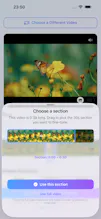
LiveMaker converts any video into a real Live Photo, entirely on-device. Pick a clip, trim it to the perfect moment, crop the frame, mute audio, and choose the key frame — then save straight to Photos as a genuine Live Photo that plays when you press it. No uploads, no account, no subscription: everything runs locally with Apple's frameworks. Free to use; a one-time $3.99 Pro upgrade removes the watermark.
Hey Product Hunt! 👋
I built LiveMaker because turning a video into a Live Photo on iPhone is weirdly hard — the built-in tools don't do it, and most apps that claim to either upload your video to a server or bury the feature behind a subscription.
LiveMaker does one thing well, entirely on-device:
🎬 Pick any video from your library
✂️ Trim to the moment you want (long videos get a section picker)
🖼 Crop the frame, mute audio, choose the key frame — the still you see in your library
📸 Save it to Photos as a real Live Photo that plays when you press it
Privacy was non-negotiable: everything runs locally with Apple's frameworks. Your video never leaves your phone, and there's no account.
It's free to use; a one-time $3.99 upgrade removes the watermark. No subscription — I don't think a utility like this should rent itself to you.
I'd love feedback — especially on what you'd want to make next: wallpapers, loops, longer motion? Ask me anything!
Report
How well does the trimming actually sync with the key frame you pick, since Live Photos are only a couple seconds long — do you have control over which exact moment gets locked in?
@cihanerany22p It should. It creates a proper LivePhoto. I have tested it by sharing it in Family album and it worked for everyone.
Report
Took a clip of my dog catching a treat and it saved as a real Live Photo on the first try, the key frame picker felt really thoughtful for nailing the exact moment.
Report
Finally an app that actually makes Live Photos work the way they should. Trimmed a short clip of my dog and it saved straight to Photos with the key frame intact.
Report
Finally got the lock screen Live Photo I wanted from a random clip — worked first try and never left my phone. The on-device processing is a nice touch for anyone wary of uploading stuff.
Cre8
How well does the trimming actually sync with the key frame you pick, since Live Photos are only a couple seconds long — do you have control over which exact moment gets locked in?
Cre8
Does the Live Photo it creates keep working across iCloud sync, or does it break down once it leaves the device?
Cre8
Took a clip of my dog catching a treat and it saved as a real Live Photo on the first try, the key frame picker felt really thoughtful for nailing the exact moment.
Finally an app that actually makes Live Photos work the way they should. Trimmed a short clip of my dog and it saved straight to Photos with the key frame intact.
Finally got the lock screen Live Photo I wanted from a random clip — worked first try and never left my phone. The on-device processing is a nice touch for anyone wary of uploading stuff.